After the basic installation, we can access to Webmin: https://yourserver:10000 (mini-server Webmin own SSL server). The target is to publish trough our Apache server in a own URL: http://webmin.yourserver.com/.
To do it we will use in the documentation http://www.webmin.com/apache.html, the less intrusive method.
We will add the Proxy modules in Apache (the server redirects other server contents, the proxy_http module to make a Http requests proxy, and the ssl module to make cache in https protocol (it joins the miniserver):
Add the following directives to our Virtual Host in Apache (in /etc/apache2/sites-available/default):
<VirtualHost *>
        ServerName webmin.tuservidor.com
        DocumentRoot /var/www/tuservidor
        ProxyRequests Off
        SSLProxyEngine On
        ProxyVia On
        <Proxy *>
                AddDefaultCharset off
                Order deny,allow
                Allow from all
        </Proxy>

        ProxyPass / https://localhost:10000/
        ProxyPassReverse / https://localhost:10000/
        ProxyPassReverseCookieDomain localhost:10000 tuservidor.com
        ProxyPassReverseCookiePath / /
</VirtualHost>
In Webmin configuration (/etc/webmin/config) add:
referer=webmin.sys.lebrijo.com
In /etc/webmin/miniserv.conf delete the line session=1 to login without cookies (I think that Webmin use GET method instead of POST method, getting variables from URL instead of cookies).
Finally, in our DNS server we must reference the webmin.tuservidor.com name. Add the record in the zone db.yourserver.com:
Una vez realiada la instalación básica, tenemos Webmin en: https://tuservidor:10000 (mini-servidor SSL propio). El objetivo será publicarlo através de nuestro apache en una dirección propia: http://webmin.tuservidor.com/.
Para ello utilizamos de la documentación http://www.webmin.com/apache.html, el método menos intrusivo.
Añadimos los módulos Proxy de apache (el servidor redirige a otro servidor), el proxy_http para hacer Proxy de peticiones http, y el SSL para el proxy del https (que es el que puenteará al mini-servidor):
Añadimos las siguientes directives a mi virtual host (en /etc/apache2/sites-available/default):
<VirtualHost *>
        ServerName webmin.tuservidor.com
        DocumentRoot /var/www/tuservidor
        ProxyRequests Off
        SSLProxyEngine On
        ProxyVia On
        <Proxy *>
                AddDefaultCharset off
                Order deny,allow
                Allow from all
        </Proxy>

        ProxyPass / https://localhost:10000/
        ProxyPassReverse / https://localhost:10000/
        ProxyPassReverseCookieDomain localhost:10000 tuservidor.com
        ProxyPassReverseCookiePath / /
</VirtualHost>
En la configuración de webmin (/etc/webmin/config) añadimos:
referer=webmin.sys.lebrijo.com
En /etc/webmin/miniserv.conf eliminamos la línea session=1 para que autentique el servidor web sin cookies ni nada (Creo que utiliza el método GET en vez del POST pasando la variable de sesion por URL en lugar de por cookie).
Finalmente, en nuestro servidor DNS tenemos que referenciar la dirección webmin.tuservidor.com. Añadimos en la zona db.tuservidor.com un registro:
We are going to see how to organize the elements in the flash framework.There are various groupping ways of objects, and clasification in flash. They are:
Groups: Objects adds in one object, which you can manage as one.
Layers: Visual levels in a scene (it makes the depth of the scenary)
Libraries: They keep the used objects, flash is object orieted, then has all the characteristics of this programming: hierachy, modularity, polimorfism,...
Scenes: Group of events separated in time, but happens one after other.
Groups
They are the first level group. They are essential for the basic figures into more complex drawings.
Trough th menu: Modify
Hotkey: Group (Ctrl G)
Undo the group: ctrl.+G+Mayus
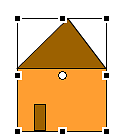
For example, the house:
image011.png999 Bytes
Groupping in:
Group home
Group roof = line+filling
Facade = line+filling
Door = line+filling
Groupping examples in the following file (source):
Layers
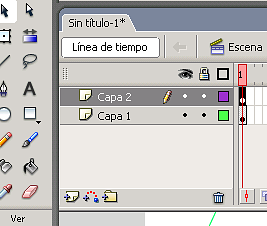
Can be used to tag different levels (in depth) in the scene. Organizing the actors in depth. The window is:
image013.png11.6 KB
It can be grouped in directories, and buid layers with
image015.png961 Bytes
Too we have the symbols, eye-lock-square:
Warning: to visualize or not the layer
Lock: to block the layer and not modify in accident
Square: to visualize diagram draw in the layer (minium drawing of the objects).