We are going to see how to organize the elements in the flash framework.There are various groupping ways of objects, and clasification in flash. They are:
Groups: Objects adds in one object, which you can manage as one.
Layers: Visual levels in a scene (it makes the depth of the scenary)
Libraries: They keep the used objects, flash is object orieted, then has all the characteristics of this programming: hierachy, modularity, polimorfism,...
Scenes: Group of events separated in time, but happens one after other.
Groups
They are the first level group. They are essential for the basic figures into more complex drawings.
Trough th menu: Modify
Hotkey: Group (Ctrl G)
Undo the group: ctrl.+G+Mayus
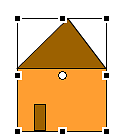
For example, the house:
image011.png999 Bytes
Groupping in:
Group home
Group roof = line+filling
Facade = line+filling
Door = line+filling
Groupping examples in the following file (source):
Layers
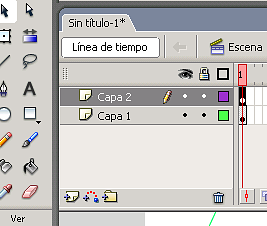
Can be used to tag different levels (in depth) in the scene. Organizing the actors in depth. The window is:
image013.png11.6 KB
It can be grouped in directories, and buid layers with
image015.png961 Bytes
Too we have the symbols, eye-lock-square:
Warning: to visualize or not the layer
Lock: to block the layer and not modify in accident
Square: to visualize diagram draw in the layer (minium drawing of the objects).