Nov 22, 07 by Juan Lebrijo about MySQL, Administration, blog
PHPMyAdmin es un administrador de la base de datos MySQL. Aplicación de administración desarrollada en PHP.
Podemos publicarla en un servidor web y administrar de forma segura nuestro SGBD MySQL de forma remota, con el único requisito de tener un navegador web.
Vamos a instalarla sobre un servidor LAMP (Linux+Apache+MySQL+PHP).
Como viene siendo habitual os dejo la tabla de referencias:
Origen
http://www.phpmyadmin.net
Repositorio
http://www.phpmyadmin.net/home_page/downloads.php
Paquete
phpMyAdmin-2.11.0-all-languages.tar.gz
Documentación (inglés)
http://wiki.cihar.com/pma/Welcome_to_phpMyAdmin_Wiki
Instalación en la shell:
Descomprimimos, y movemos el directorio al raiz:
tar -zxvf phpMyAdmin-2.11.0-all-languages.tar.gz
mv phpMyAdmin-2.11.0-all-languages /var/www/mysql
Copiamos el fichero de configuración genérico en el que va a ser el fichero de configuración:
cd /var/www/mysql
cp config.sample.inc.php config.inc.php
Configuración del fichero /var/www/mysql/config.inc.php:
Rellenamos esta frase aleatoria para la identificación de las cookies al conectar:
Following with groping levels in flash. Now we are going to talk about the libraries that can formed in the files.
The libraries are, in my opinion, a strong feature. Here we can see the software quality, this absolutely Objects Oriented, due to the oriented of itself programming.
Libraries
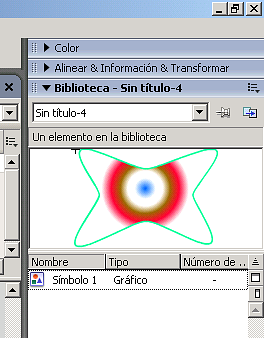
Access to Library pallette from: Windows menu --> Libraries.
You could add a symbol dragging it to the palette. The most important advantage is: remake the symbol tree 80 times to draw a wood, only saving the positions, to save less bytes.
image017.png17.9 KB
You could create directories to group several symbols (right mouse button). Grouping examples in the following file (source):
Scenes
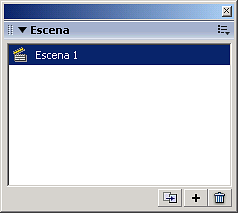
The escenes are the acts in a theatre work, independents in time, but reusing the actors. We have the scenes palette in: Windows --> Other Pannels --> Scene
image053.png2.53 KB
In this palette we can: duplicate, create and delete scenes.
Seguimos con los niveles de agrupación de Flash. Esta vez las bibliotecas que se pueden formar dentro de los ficheros.
Las bibliotecas son, en mi opinión, el gran punto fuerte. Aquí se nota la calidad del software, que está totalmente orientado a objetos, supongo que por que eel mismo está programado bajo esta filosofía.
Bibliotecas
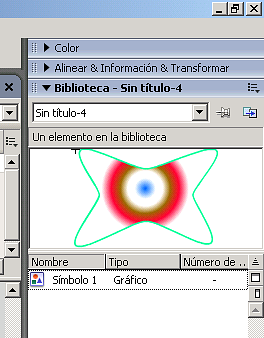
La paleta de Bibliotecas se accede: menú Ventana --> Bibliotecas Se añade un símbolo a la biblioteca arrastrando el símbolo a la paleta. La ventaja más importante es: reutilizar el símbolo árbol 80 veces para dibujar un bosque, solo guardando las posiciones, con lo que supone para ahorrar memoria
image017.png17.9 KB
Se pueden crear carpetas para agrupar si tienes muchos símbolos (boton derecho raton). Ejemplos de agrupación en el siguente fichero (fuente):
Escenas
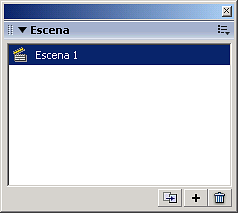
Las escenas son como los actos de una obra, independientes entre sí en el tiempo, pero con reutilización de actores. Tenemos la paleta de escenas en: Ventana --> Otros Paneles --> Escena
image053.png2.53 KB
En esta paleta podemos: duplicar, crear y borrar escenas.