Vamos a ver como organizar los elementos dentro del entorno Flash 8. Existen varias formas de agrupación de objetos y de clasificación de trabajos en Flash. Son:
Agrupaciones: Grupos de objetos unido en uno solo que se puede manejar por el lienzo como uno.
Capas: Niveles visuales dentro de una escena (marcan la profundidad en espacio del escenario)
Bibliotecas: Guardan los objetos utilizados, flash es claramente orientado a objetos, de modo que todas sus características se cumplen: herencia, modularidad, polimorfismo,...
Escenas: Conjunto de sucesos en el tiempo independientes entre sí pero que suceden uno tras otro.
Agrupaciones
Son el primer nivel de agrupación. Son esenciales para agrupaciones de figuras básicas dentro de figuras más complejas.
A través de menú: Modificar
Atajo: Agrupar (Ctrl G)
Para deshacer la agrupación: ctrl.+G+Mayus
Por ejemplo, la Casa:
image011.png999 Bytes
Agrupado en:
Grupo casa
Grupo tejado = Contorno+relleno
Fachada = Contorno+relleno
Puerta = Contorno+relleno
Ejemplos de agrupación en el siguente fichero (fuente):
Capas
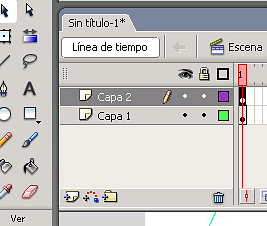
Se utiliza para marcar diferentes niveles de escena. Organizamos a los actores en profundidad. Su paleta es:
image013.png11.6 KB
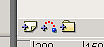
Se pueden agrupar en carpetas y crear capas con
image015.png961 Bytes
También tiene los símbolos, ojo-candado-cuadro:
ojo: es para visualizar o no la capa
Candado: para bloquearla y no poder modificarla por accidente
Cuadro: para vusializar en modo esquema los elementos de la capa (trazos minimalistas para hacerte una idea).
elite:~# apt-get install perl libnet-ssleay-perl openssl libauthen-pam-perl libpam-runtime libio-pty-perl libmd5-perl
Leyendo lista de paquetes... Hecho
Creando árbol de dependencias... Hecho
perl ya está en su versión más reciente.
openssl ya está en su versión más reciente.
libpam-runtime ya está en su versión más reciente.
Se instalarán los siguientes paquetes NUEVOS:
  libauthen-pam-perl libio-pty-perl libmd5-perl libnet-ssleay-perl
0 actualizados, 4 se instalarán, 0 para eliminar y 1 no actualizados.
Necesito descargar 273kB de archivos.
Se utilizarán 1221kB de espacio de disco adicional después de desempaquetar.
After, copy the .deb package and install with the following sentence:
elite:~# dpkg --install webmin_1.360_all.deb
Seleccionando el paquete webmin previamente no seleccionado.
(Leyendo la base de datos ...
23140 ficheros y directorios instalados actualmente.)
Desempaquetando webmin (de webmin_1.360_all.deb) ...
Configurando webmin (1.360) ...
Webmin install complete. You can now login to https://elite:10000/
as root with your root password, or as any user who can use sudo
to run commands as root.
Things made by the installer:
Login directly from the system: it has installed PAM; /etc/pam.d/webmin
Install all content in /usr/share/webmin/
Makes the system respond to the URL: https://your server.com:10000/. Webmin implements a own server:
Webmin es un sistema de administración vía web (remota) de los servicios de nuestros servidores.
Vamos a instalar Webmin en un servidor LAMP montado sobre Debian Etch.
Os dejo una ficha por si quereis profundizar con Webmin:
Origen
http://www.webmin.com/
Repositorio
http://www.webmin.com/download.html
Paquete
webmin_1.360_all.deb
Documentación (Inglés)
Instalación: http://www.webmin.com/deb.html
Instalación en Apache: http://www.webmin.com/apache.html
Doc: http://www.webmin.com/docs.html
Antes de la instalación solucionamos dependencias previas. Debeis instalar los siguientes paquetes si no los teneis instalados:
elite:~# apt-get install perl libnet-ssleay-perl openssl libauthen-pam-perl libpam-runtime libio-pty-perl libmd5-perl
Leyendo lista de paquetes... Hecho
Creando árbol de dependencias... Hecho
perl ya está en su versión más reciente.
openssl ya está en su versión más reciente.
libpam-runtime ya está en su versión más reciente.
Se instalarán los siguientes paquetes NUEVOS:
  libauthen-pam-perl libio-pty-perl libmd5-perl libnet-ssleay-perl
0 actualizados, 4 se instalarán, 0 para eliminar y 1 no actualizados.
Necesito descargar 273kB de archivos.
Se utilizarán 1221kB de espacio de disco adicional después de desempaquetar.
Copiamos el .deb e instalamos:
elite:~# dpkg --install webmin_1.360_all.deb
Seleccionando el paquete webmin previamente no seleccionado.
(Leyendo la base de datos ...
23140 ficheros y directorios instalados actualmente.)
Desempaquetando webmin (de webmin_1.360_all.deb) ...
Configurando webmin (1.360) ...
Webmin install complete. You can now login to https://elite:10000/
as root with your root password, or as any user who can use sudo
to run commands as root.
Cosas que ha hecho el instalador:
Valida directamente del sistema: ha instalado PAM; /etc/pam.d/webmin
Instala todo el contenido en /usr/share/webmin/
Hace que el sistema responda a la dirección: https://tuservidor.com:10000/. Con un miniservidor web propio: