Llegamos a la joya de Flash, las animaciones. Hasta ahora solo hemos editado figuras, y para ello tenemos mejores herramientas como Photoshop (también de Adobe).
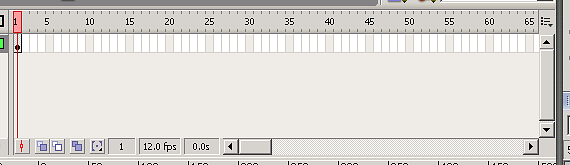
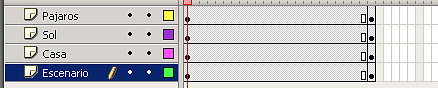
La paleta de fotogramas nos marca la escena en el eje de tiempos:
image027.png2.92 KB
Para borrar fotogramas bien:
Seleccionamos los fotoframas.
Boton derecho raton --> borrar fotogramas
Para hacer una animación frame a frame:
Boton derecho raton “Insertar fotograma clave” ó F6 en el siguiente frame.
Lo cambiamos un poco.
Insertamos frame clave en el siguiente,....
Pero la más cómoda es "Animación por interpolación de movimiento" (todo desde boton derecho raton):
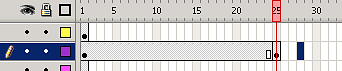
Insertamos fotograma clave en un intervalo amplio
image029.png1.28 KB
Insertamos con “Crear Interpolación” (pulsando intro podemos ver como se mueve).
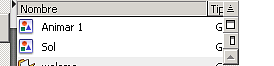
Al crear interpolación crea un símbolo de objeto raí “Animar 1”. “Sol” sería la instancia de animar 1, es decir la animación.
image031.png1.63 KB
Para crear frames para todo y ver el movimiento, en la escena, botón-derecho-Insertar fotograma sobre todos los elementos.
image033.png1.91 KB
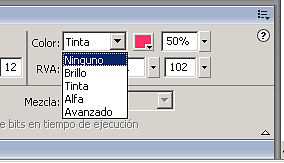
Puede interpolarse no solo el movimiento, también el color:
image035.png2.63 KB
Para ejemplo está el siguiente, en el que animamos un sol y unos pajarillos (fuente):
Nov 29, 07 by Juan Lebrijo about design, Windows, blog
Searching for improving my XP boring desktop, i found some ideas which I am going to show you.
The XP Desktop seems obsolete by Vista Aero or the 3D linux desktop (Compiz-beryl), but I believe that is very important nowadays, really is the more used.
We mount the applications over a Windows XP system with Service Pack 2.
Really mounting applications over Windows is as easy as download and execute it; then we only show the aplications and the links to download.
Widgets to customize your desktop
A way to become pretty your enviroment are the yahoo barr gadgets, clock, system monitor, calendar, and more. Certainly they take much memory, but the keep very well in the desktop and they appear very pretty. At same time I installed the Google toobar, but have less widgets, and the esthethic y more awful, but it takes less memo.
The installation proccess is easy:
After, choose and install more interest widgets in its Galery.
Visual Task Tips
Other tool are the drawing windows in the task bar:
tips.PNG59.3 KB
They are the images of the active tasks in the bar. You can find it in the web of the proyect: Visual Task Tips.
Wallpaper
At last my favourite app: Xplanet. This tool makes a wallpaper periodically with instant Solar System situation, from your chosen point of view.
Obiously is a renderization with skins, planets and satelital orbits, from an athrologic calculation. The only real skin is the clouds map which is taken from meteorologic satelites.
The thing I like more is the views which you could see. In amy desktosp I have the earth and moon updating every ten minutes, then I can see nightfalling and dawn the planet, and the relative possition of the moon. !!! As I am in my space ship window ¡¡¡¡¡
I must say that to configure it, I downloaded the GUI winXPlanetBG, in this page we have a little manual to configure the tool.
Of course you must loss some time reading the links to manage the tool and shopw some pretty wallpaper.
I leave some Desktop images:
[gallery=2]
Nov 29, 07 by Juan Lebrijo about design, Windows, blog
Buscando como mejorar el aburrido escritorio de Windows XP, encontré unas ideas que os voy a contar.
El escritorio de Windows XP parece superado por Vista ó por los 3D de linux (Compiz-beryl), pero yo creo que aún tiene mucho que decir, de hecho es el más usado.
Montaremos las aplicaciones sobre un Windows XP con Service Pack 2.
Lo cierto es que montar aplicaciones sobre Windows es tan fácil como descargar el ejecutable y ejecutarlo, de modo que prácticamente describiremos las aplicaciones.
Widgets para personalizar el escritorio
Una forma de embellecer el entorno son los gadgets de la barra de yahoo, el reloj, el monitor de sistema, calendario, y muchos más. Si bien es cierto que ocupan demasiada memoria, se incrustan en el escritorio muy bien y la apariencia es muy estética. Al mismo tiempo instalé la barra de Google, y, aunque derrochaba menos memoria, tiene menos widgets, y su apariencia me resulta más tosca.
El procedimiento fué sencillo:
Después, a elegir e instalar los widgets que más me interesasen de su Galería.
Visual Task Tips
Otra herramienta son las estampas de ventana en la barra de tareas:
tips.PNG59.3 KB
Estan son las imágenes de las tareas activas en la barra. Podeis encontrarlo en la web del proyecto: Visual Task Tips.
El fondo de escritorio
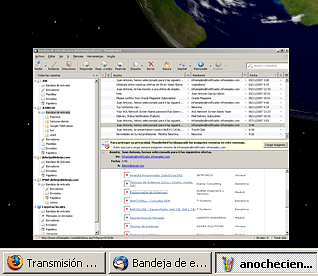
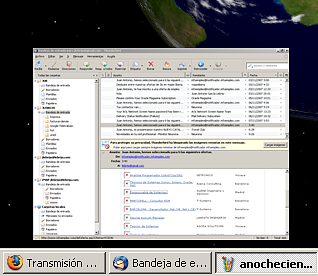
Por último, lo que más me gusta: Xplanet. Esta herramienta te genera un fondo de escritorio periodicamente con la situación intantanea del Sistema Solar, según el punto desde donde lo quieras ver.
Naturalmente es una renderización con pieles, órbitas de los cuerpos celestes, a partir de un cálculo astrológico preciso. Lo más real es el mapa de nubes de la tierra que se toma de satélites meteorológicos.
Lo que más me gusta son las perspectivas que puedes llegar a ver. En mi escritorio tengo al sol y a la luna actualizándose cada 10 minutos, de manera que veo como anochece ó amanece en el planeta, y la posición relativa de la luna. ! Como si estuviera frente a una escotilla de mi nave espacial ¡¡¡¡¡
Debo decir que para configurarla, me descargué también el GUI winXPlanetBG, en esta página además de la descarga tienen un pequeño manual de como configurar la herramienta.
Por supuesto hace falta echar un rato leyendo los dos enlaces que os he puesto para manejar la herramienta, y sacar algo decente.
Os dejo algunas imágenes de mi escritorio:
[gallery=2]