Domain Name System, is the service which we due the prety domain names in the actual internet, instead of the uglies IP numbers.
Bind is the software more used too implement this service, and we sil show how We intall it in a Debian Etch distro.Our initial conditions:
Fixed IP provided by the ISP (ej. 85.48.162.99). In Spain, in the post date I recomend Orange as the ISP whith the Fixed IP Service cheapest (2 €/mes).
Domain name (ej. lebrijo.com) brought to a Register Company. I recomend http://www.domiteca.com, in this post date they give me a very efficient service, but they are not the cheapest in Spain.
If we are going to mount a serve rin that direction, we have to ask the register to meke a zone delegation (lebrijo.com) into our fixed IP (85.48.162.99). Then everybody who ask for something.lebrijo.com comes to our server to ask; or, at least, all the super-servers take the information from our sone file in our server, and they reply good to de question ¿Where is something.lebrijo.com?.
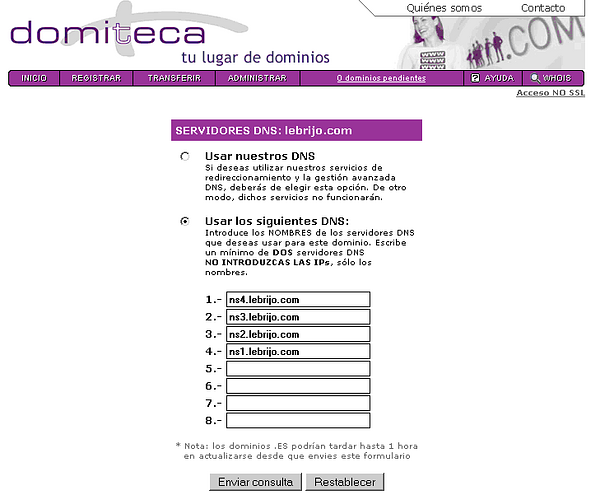
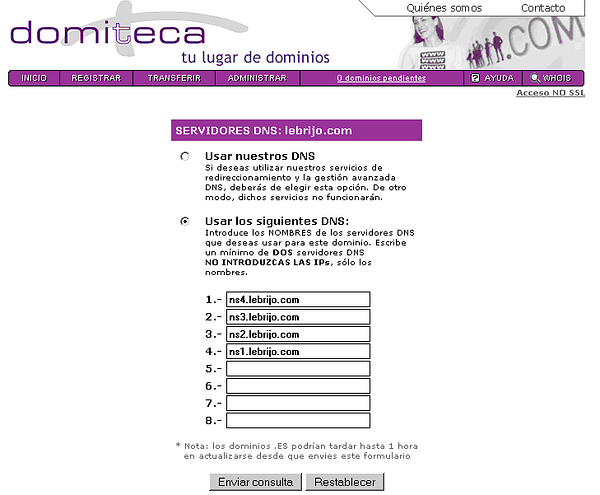
The register must know where is managing the zone zona lebrijo.com. We write our DNS.
domiteca.PNG104 KB
We can see four names refered to the same machine, The perfect action is having primary and secondary servers, they can fall down....., but we have a poor budget, and we have an alone server.
The second action is opening our firewall, and/or NATing our router to deflect the petitions to the port 85.48.162.99:53 to our server with private IP 192.168.1.23:53.
Instalation
Installing, quickly on Debian
elite:~# apt-get install bind9
Leyendo lista de paquetes... Hecho
Creando árbol de dependencias... Hecho
dnsutils ya está en su versión más reciente.
Paquetes sugeridos:
  bind9-doc
Se instalarán los siguientes paquetes NUEVOS:
  bind9
0 actualizados, 1 se instalarán, 0 para eliminar y 6 no actualizados.
Necesito descargar 441kB de archivos.
Se utilizarán 901kB de espacio de disco adicional después de desempaquetar.
Add your zones to the file /etc/bind/named.conf
zone "lebrijo.com" {
      type master;
      file "/etc/bind/db.lebrijo.com";
};

zone "0.168.192.in-addr.arpa" {
 type master;
 file "/etc/bind/db.192.168.0";
};
Create a file to direct zone db.lebrijo.com:
;
; BIND data file for zone lebrijo.com
;

$TTL 3600        ; 1 hour
@    IN      SOA      ns1.lebrijo.com. root.lebrijo.com. (
                                2007083001      ; Serial
                                10800           ; Refresh
                                3600            ; Retry
                                604800          ; Expire
                                86400           ; Minimum TTL
                        )
; Servidores DNS
                IN      NS      ns1.lebrijo.com.
                IN      NS      ns2.lebrijo.com.
                IN      NS      ns3.lebrijo.com.
                IN      NS      ns4.lebrijo.com.

; Servidores de correo
                IN      MX      0	correo.lebrijo.com.
                IN      A       85.48.162.99

; Nombres de Máquina
localhost       IN      A       127.0.0.1
ns1             IN      A       85.48.162.99
ns2             IN      A       85.48.162.99
ns3             IN      A       85.48.162.99
ns4             IN      A       85.48.162.99
correo          IN      A       85.48.162.99
ntp             IN      A       85.48.162.99

; Webs servidas
www             IN      A       85.48.162.99
blog            IN      A       85.48.162.99
curriculum      IN      CNAME   www
We can see various things:
Four DNS servers to the same machine.
MX is the tag for email servers. We must put any relay, but we are poor.
We must redirect to our own IP. All machines and services.
At least we put our published webs.
Operation
The server (or every one acts as client) we must add the first line on /etc/resolv.conf:
When you want to push the zones on the root servers, because you are adding regiters or changing configurations:
Change the Serial tag in zone file (db.lebrijo.com), this is the fiel which the root server use to know the last version. The number is (in convention) date an version, but it can be an incremental number.
Sep 24, 07 by Juan Lebrijo about DNS, Services, blog
Domain Name System, es el servicio gracias al cual podemos utilizar bonitos nombres de dominio en lugar de inmemorizables direcciones IP.
Bind es la aplicación más ampliamente utilizada para implementar estre servidor, y la vamos a instalar sobre un Debian Etch.
Mis condiciones de partida son:
Dirección IP fija proporcionada por el ISP (ej. 85.48.162.99). En españa en la fecha del artículo recomiendo Orange, ya que es el que menos cobra por este servicio (2 €/mes).
Nombre de dominio (ej. lebrijo.com) comprado a una Empresa Registradora. Recomiendo http://www.domiteca.com, a fecha del artículo me han dado un servicio muy eficaz, aunque ya sé que no es el más barato.
Si vamos a montar el servidor en la dirección anterior, tenemos que solicitar al registrador que nos delege la zona (lebrijo.com) a la IP fija que tenemos (85.48.162.99). Para que a todo el mundo que pregunte por algo.lebrijo.com venga a nuestro servidor a preguntar; ó por lo menos todos los servidores superiores cojan el fichero de zona alojado ahí, y respondan bien ante la pregunta ¿donde está algo.lebrijo.com?.
El registrador debe saber donde se controla la zona lebrijo.com. Ponemos nuestros DNS.
domiteca.PNG104 KB
Veremos que aunque sean cuatro están referenciados al mismo servidor, lo ideal es que tengamos primario y secundarios por si se caen y todo eso....., pero somos humildes y solo tenemos un servidor.
En segundo lugar tendremos que abrir nuestro firewall, y/o hacer NAT en nuestro router de cabecera para que cualquier petición al puerto 85.48.162.99:53 sean respondidas por nuestro servidor.
Instalación
Instalamos, fácil en debian:
elite:~# apt-get install bind9
Leyendo lista de paquetes... Hecho
Creando árbol de dependencias... Hecho
dnsutils ya está en su versión más reciente.
Paquetes sugeridos:
  bind9-doc
Se instalarán los siguientes paquetes NUEVOS:
  bind9
0 actualizados, 1 se instalarán, 0 para eliminar y 6 no actualizados.
Necesito descargar 441kB de archivos.
Se utilizarán 901kB de espacio de disco adicional después de desempaquetar.
Añadimos nuestras zonas al /etc/bind/named.conf
zone "lebrijo.com" {
      type master;
      file "/etc/bind/db.lebrijo.com";
};
zone "0.168.192.in-addr.arpa" {
	type master;
	file "/etc/bind/db.192.168.0";
};
Creamos un fichero de zona directa db.lebrijo.com:
;
; BIND data file for zone lebrijo.com
;
$TTL 3600        ; 1 hour
@    IN      SOA      ns1.lebrijo.com. root.lebrijo.com. (
                                2007083001      ; Serial
                                10800           ; Refresh
                                3600            ; Retry
                                604800          ; Expire
                                86400           ; Minimum TTL
                        )

; Servidores DNS
                IN      NS      ns1.lebrijo.com.
                IN      NS      ns2.lebrijo.com.
                IN      NS      ns3.lebrijo.com.
                IN      NS      ns4.lebrijo.com.

; Servidores de correo
                IN      MX      0	correo.lebrijo.com.

                IN      A       85.48.162.99

; Nombres de Máquina
localhost       IN      A       127.0.0.1
ns1             IN      A       85.48.162.99
ns2             IN      A       85.48.162.99
ns3             IN      A       85.48.162.99
ns4             IN      A       85.48.162.99
correo          IN      A       85.48.162.99
ntp             IN      A       85.48.162.99

; Webs servidas
www             IN      A       85.48.162.99
blog            IN      A       85.48.162.99

curriculum      IN      CNAME   www
Observemos varias cosas del fichero:
Marcamos los cuatro servidores dns a la misma máquina.
MX es la etiqueta de los servidores de correo. Abría que poner algún relay, pero como comentaba antes somos humildes.
Luego todo eso hay que direccionarlo a la IP propia. Cualquier nombre de máquina y de servicio.
Por último las webs que servimos.
Operación
Para que el servidor (ó cualquiera actuen como cliente) debemos añadir en primera línea de /etc/resolv.conf:
Cuando quieras propagar las zonas a los raices por que hayas añadido un registro, ó cambiado la configuración:
Cambias el campo Serial del fichero de zona (db.lebrijo.com), ya que en este campo se basan los servidores superiores para saber cual es el último. El número se suele componer de fecha y versión, pero podría ser un número incremental.
2007083001 ; Serial
Y haces un reload para que cargen las nuevas zonas y se propaguen.
Sep 21, 07 by Juan Lebrijo about NTP, Services, blog
Network Time Protocol, es un protocolo que sirve para sincronizar relojes de los sistemas operativos sobre TCP(UDP)/IP.
Este artículo trata de explicar muy brevemente como se instala y se utiliza servidor y cliente sobre un Debian Etch.
Instalación:
elite:~# apt-get install ntp ntpdate ntp-server ntp-simple
Leyendo lista de paquetes... Hecho
Creando árbol de dependencias... Hecho
Paquetes sugeridos:
  ntp-doc
Se instalarán los siguientes paquetes NUEVOS:
  ntp ntp-server ntp-simple ntpdate
0 actualizados, 4 se instalarán, 0 para eliminar y 3 no actualizados.
Necesito descargar 449kB de archivos.
Se utilizarán 1098kB de espacio de disco adicional después de desempaquetar.
En el fichero de configuración /etc/ntp.conf, cambiamos:
Descomentamos la línea: logfile /var/log/ntpd. Si deseamos apuntar las consultas que se hacen a nuestro servidor, sincronizaciones con otros, etc.
Añadimos los servidores padre, esto es opcional, por que con los pool que vienen configurados, ya sincroniza bien:
server chronos.bulma.net
server es.pool.ntp.org
server ntp.obspm.fr
server ntp.cs.strath.ac.uk
server europe.pool.ntp.org
server pool.ntp.org
Para conrtolar el demonio del servidor tenemos el script: /etc/init.d/ntp restart
AL probar ya el funcionamiento del servidor quiero daros algunos avisos:
Tarda un buen rato en sincronizarse (~30min), hasta entonces sigue como si no funcionara
Si lo abrimos como servidor (quitando las restricciones) no servirá la hora hasta que no se sincronice con otros.
Es posible que haya que abrir el firewall: Puerto 123 TCP/UDP. Ó hacer NAT en el router de salida, depende de como sea vuestro sistema.
Para hacer comprobaciones tenemos las herramientas:
ntpq –pn: Muestra con que servidores esta calculando la sincronización.
ntptrace –n: Muestra los servidores origen de nuestra hora, el stratum en el que estamos etc.
tail -f /var/log/ntpd: Monitorizamos el log de ntp.