Usually we have not fixed IP in our home connection, it have a cost and the bucget is little (null).
The target is to warn to a DNS server when our Internet Service Provider (ISP) changes our IP direction, to reply new IP in following queries.
To do this, publish our domain, usually will be dirrected through a Dinamic DNS Service as provided by www.dyndns.org company.
There are two ways to make the synchronization:
Through the router: the router notifies the service (p.e. dyndns.org) all the IP changes. It is the most reliable, since it notify inmediately the changes. Firmware router must have this option.
With an schedule task: your machine test your public IP witha a fixed frequency, and if it changes, it notifies to the server. This method can prompt a time without service, between the change and the next test. The least reliable (routers without this option).
I used theese two services:
freedns.afraid.org: I recommend it, much posibilities to work, as controlling subdomains. FreeBSD service implemanted (=high reliability).
www.dyndns.org: The most famous company for this purpose. Usually the routers sinchronize with it. The problem: if router sends many sinchronization messages, they cancel your account, levin you web without visibility (it suceed many times).
Nowadays routers have a synchronization option with some Dynamic DNS services.
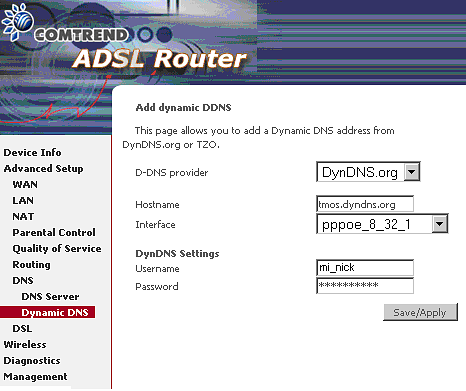
In may case Comtrend 536+ is the router, it we must configure as follows:
dyndns.02.png14 KB
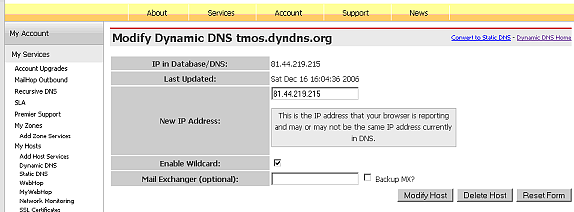
Then, when IP changes, it notifies to dyndns.org. This way when a DNS server ask for the direction tmos.dyndns.org, dyndns.org's servers reply with our new IP notified by the router.
Therefore my direction must ponit to my home webserver: http://tmos.dyndns.org.
The routers Linksys WRT54G can synchronize with freedns.afraid.org, that I recomend better then dyndns.org.
Synchronize with a Script in the crontable
Go to the solution in the following link: http://foertsch.name/DynDNS/ here you can download a shell script wich points the IP number in a file.
It has to be configured, and to be scheduled in the file /etc/crontab to run every 5 minutes.
You can find other ideas, or for non-unix systems in the following link: http://freedns.afraid.org/scripts/freedns.clients.php
Sep 27, 07 by Juan Lebrijo about Debian, operating systems, blog
Quiero mostraros como es el proceso de instalación de una distribución Debian-Etch en su versión instalación desde la red.
Esta instalación es de Servidor, por tanto la voy a dejar con lo mínimo pero operativa para seguir instalándole más componentes.
Esta distro se puede instalar muy bien desde un CD de 100 MB, y una buena conexión de Banda Ancha.
El CD lo podeis descargar desde la página oficial de Debian, aquí.
Instalación
Primero el hardware sobre el que lo vamos a instalar:
Micro: Pentium III a 667 MHz
RAM: 384 MB
Red: Realtek 8139 a 10/100 Mbps.
HD: 20GB IDE
SO: Debian-4.0 (Etch) Netinst
Arrancamos el equipo desde el CD conectado a una boca de red ethernet. La instalación consistirá en unos pocos pasos y, dependiendo de la velocidad de tu conexión, un buen tiempo de descarga e instalación de los paquetes básicos:
Nombre: elite. Dominio: lebrijo.com.
Distribuimos las particiones en el disco. Mi ejemplo se trata de un servidor web, así que más o menos hice esto:
hda1
5.9 GB
ext3
/
hda2
784 MB
swap
**
hda3
512 MB
ext3
/var/log
hda4
12.9 GB
ext3
/var/www
Ponemos la contraseña de root (ya sabeis, que sea robusta). Y creamos un usario no-administrador.
Añadir fuentes para la descarga de paquetes cercanas (yo resido en España): ftp.rediris.es,es.debian.org.
Instalamos GRUB por defecto, como Gestor de Arranque.
Para volver esta configuración inicial ejecutar: base-config.
Puesta a punto
Actualizamos las listas de software:
elite:/etc/apt# apt-get update
Des:1 http://security.debian.org stable/updates/main Packages [413kB]
Des:2 ftp://ftp.es.debian.org stable/main Packages [4535kB]
Des:3 http://security.debian.org stable/updates/main Release [110B]
Obj http://security.debian.org stable/updates/contrib Packages
Des:4 http://security.debian.org stable/updates/contrib Release [113B]
Des:5 ftp://ftp.de.debian.org stable/main Packages [4535kB]
Des:6 ftp://ftp.es.debian.org stable/main Release [95B]
Des:7 ftp://ftp.es.debian.org stable/main Sources [1322kB]
Des:8 ftp://ftp.es.debian.org stable/main Release [97B]
Des:9 ftp://ftp.de.debian.org stable/main Release [95B]
Des:10 ftp://ftp.de.debian.org stable/main Sources [1322kB]
Des:11 ftp://ftp.de.debian.org stable/main Release [97B]
Descargados 12,1MB en 5m51s (34,5kB/s)
Leyendo lista de paquetes... Hecho
La instalación anterior es mínima, por lo que yo instalo además algún paquete necesario para la administración e instalación del sistema y futuros componenetes a instalar.
Servicios instalados:
SSH: Servidor de consola para administrar de forma remota el servidor.
zip/unzip: compresores para abrir paquetes de instalación.
apt-get install openssh-server
apt-get install zip unzip
Configuración de idioma
Una dificultad que me he encontrado en esta versión de Debian (la etch), y que puede ser que encontreis vosotros, es que no configuraba bien en las variables de entorno el lenguaje. Yo lo he solucionado como sigue.
Declara mos en /etc/enviroment las siguientes variables:
En el fichero de resolución /etc/resolv.conf, debe estar vuestra configuración DNS. 192.168.0.1 será vuestro servidor de nombres de dominio:
nameserver 192.168.0.1;
I want to show you how you can install the distro Debian-Etch in the network installation version.
This installation is for a Server, then we going to make a minium installation, but operating to install all our systems.
This is installed with a CD(100 MB ocupation), and a good Wide Band connection.
You can download the CD ISO from the official Debian page, here.
Instalación
First of all, the details of the hardware:
Micro: Pentium III a 667 MHz
RAM: 384 MB
Red: Realtek 8139 a 10/100 Mbps.
HD: 20GB IDE
SO: Debian-4.0 (Etch) Netinst
Boot from the CD the machine to a ethernet connected. The installation consists in a few steps and, depends of the connection speed, a long time to download and intalling the basic packages:
Name: elite. Domain: lebrijo.com.
Distribute the partitions in the Hard disc. The example is a web server, then I made this ditribution:
hda1
5.9 GB
ext3
/
hda2
784 MB
swap
**
hda3
512 MB
ext3
/var/log
hda4
12.9 GB
ext3
/var/www
Fill root password (you know, secure password). And create a non-administrator user.
Add download servers near your town as possible (I am livin in Spain): ftp.rediris.es,es.debian.org.
Install GRUB as boot manager.
To retur the initial configuration, type in the bash: base-config.
Tunning our installation
Upgrade the software lists:
elite:/etc/apt# apt-get update
Des:1 http://security.debian.org stable/updates/main Packages [413kB]
Des:2 ftp://ftp.es.debian.org stable/main Packages [4535kB]
Des:3 http://security.debian.org stable/updates/main Release [110B]
Obj http://security.debian.org stable/updates/contrib Packages
Des:4 http://security.debian.org stable/updates/contrib Release [113B]
Des:5 ftp://ftp.de.debian.org stable/main Packages [4535kB]
Des:6 ftp://ftp.es.debian.org stable/main Release [95B]
Des:7 ftp://ftp.es.debian.org stable/main Sources [1322kB]
Des:8 ftp://ftp.es.debian.org stable/main Release [97B]
Des:9 ftp://ftp.de.debian.org stable/main Release [95B]
Des:10 ftp://ftp.de.debian.org stable/main Sources [1322kB]
Des:11 ftp://ftp.de.debian.org stable/main Release [97B]
Descargados 12,1MB en 5m51s (34,5kB/s)
Leyendo lista de paquetes... Hecho
Previous installation is minium, then I will installa some packages needed for the installation an administration of future systems an components:
SSH: Secure terminal server for remote server administration.
zip/unzip: usualli compressors.
apt-get install openssh-server
apt-get install zip unzip
Language configuration
A dificult that I found in this Debian version (etch), and you can find, is the un configuration of the language enviroment variables. I have solved as follow.