Domain Name System, is the service which we due the prety domain names in the actual internet, instead of the uglies IP numbers.
Bind is the software more used too implement this service, and we sil show how We intall it in a Debian Etch distro.Our initial conditions:
Fixed IP provided by the ISP (ej. 85.48.162.99). In Spain, in the post date I recomend Orange as the ISP whith the Fixed IP Service cheapest (2 €/mes).
Domain name (ej. lebrijo.com) brought to a Register Company. I recomend http://www.domiteca.com, in this post date they give me a very efficient service, but they are not the cheapest in Spain.
If we are going to mount a serve rin that direction, we have to ask the register to meke a zone delegation (lebrijo.com) into our fixed IP (85.48.162.99). Then everybody who ask for something.lebrijo.com comes to our server to ask; or, at least, all the super-servers take the information from our sone file in our server, and they reply good to de question ¿Where is something.lebrijo.com?.
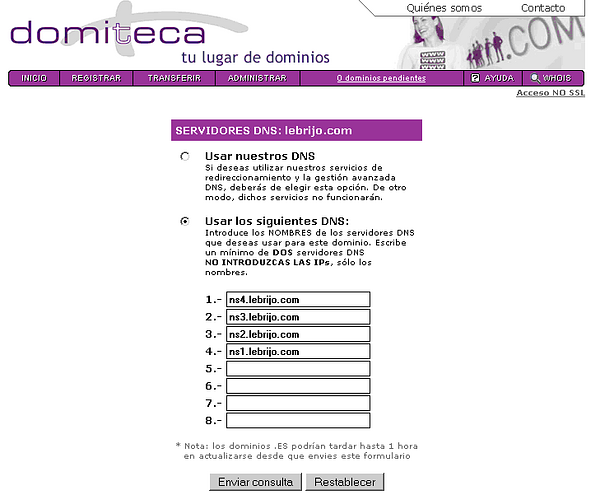
The register must know where is managing the zone zona lebrijo.com. We write our DNS.
domiteca.PNG104 KB
We can see four names refered to the same machine, The perfect action is having primary and secondary servers, they can fall down....., but we have a poor budget, and we have an alone server.
The second action is opening our firewall, and/or NATing our router to deflect the petitions to the port 85.48.162.99:53 to our server with private IP 192.168.1.23:53.
Instalation
Installing, quickly on Debian
elite:~# apt-get install bind9
Leyendo lista de paquetes... Hecho
Creando árbol de dependencias... Hecho
dnsutils ya está en su versión más reciente.
Paquetes sugeridos:
  bind9-doc
Se instalarán los siguientes paquetes NUEVOS:
  bind9
0 actualizados, 1 se instalarán, 0 para eliminar y 6 no actualizados.
Necesito descargar 441kB de archivos.
Se utilizarán 901kB de espacio de disco adicional después de desempaquetar.
Add your zones to the file /etc/bind/named.conf
zone "lebrijo.com" {
      type master;
      file "/etc/bind/db.lebrijo.com";
};

zone "0.168.192.in-addr.arpa" {
 type master;
 file "/etc/bind/db.192.168.0";
};
Create a file to direct zone db.lebrijo.com:
;
; BIND data file for zone lebrijo.com
;

$TTL 3600        ; 1 hour
@    IN      SOA      ns1.lebrijo.com. root.lebrijo.com. (
                                2007083001      ; Serial
                                10800           ; Refresh
                                3600            ; Retry
                                604800          ; Expire
                                86400           ; Minimum TTL
                        )
; Servidores DNS
                IN      NS      ns1.lebrijo.com.
                IN      NS      ns2.lebrijo.com.
                IN      NS      ns3.lebrijo.com.
                IN      NS      ns4.lebrijo.com.

; Servidores de correo
                IN      MX      0	correo.lebrijo.com.
                IN      A       85.48.162.99

; Nombres de Máquina
localhost       IN      A       127.0.0.1
ns1             IN      A       85.48.162.99
ns2             IN      A       85.48.162.99
ns3             IN      A       85.48.162.99
ns4             IN      A       85.48.162.99
correo          IN      A       85.48.162.99
ntp             IN      A       85.48.162.99

; Webs servidas
www             IN      A       85.48.162.99
blog            IN      A       85.48.162.99
curriculum      IN      CNAME   www
We can see various things:
Four DNS servers to the same machine.
MX is the tag for email servers. We must put any relay, but we are poor.
We must redirect to our own IP. All machines and services.
At least we put our published webs.
Operation
The server (or every one acts as client) we must add the first line on /etc/resolv.conf:
When you want to push the zones on the root servers, because you are adding regiters or changing configurations:
Change the Serial tag in zone file (db.lebrijo.com), this is the fiel which the root server use to know the last version. The number is (in convention) date an version, but it can be an incremental number.