Apart from the good planning in object orientation. Flash havs this Script language which effort the applications.
In the future we will do a series of posts analyzing its posibilities. Nowadays show you how we can iniciate the use of this.
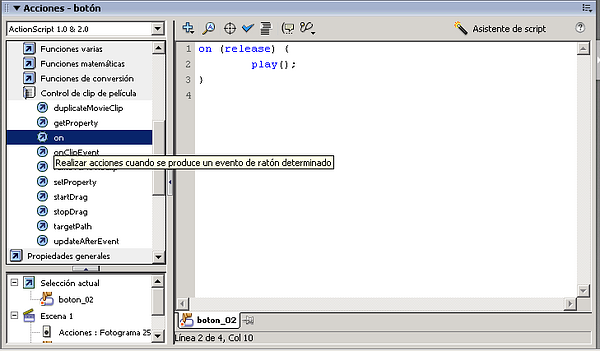
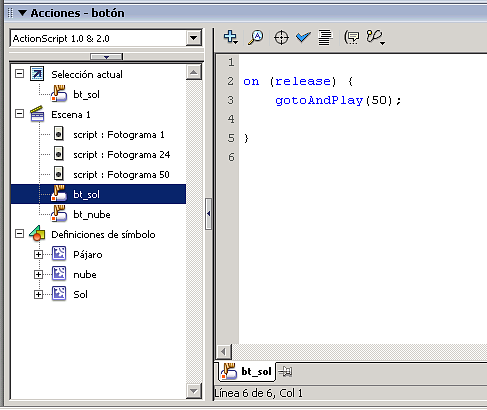
To see the actions of an object (for example a button) we have the Actions palette. Windows --> Actions:
image047.png87.2 KB
In the figure:
At left we have:
Up: libraries with all functions of ActionScript
Down: all the objects in the file containing ActionScript code
At right have the script which we are programming.
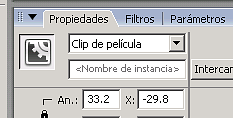
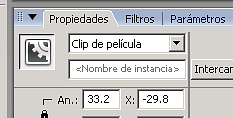
Warning: to action it, we must make a movie clip:
image039.png2.5 KB
Although better is, to order correctly, create a movie clip and group all good.
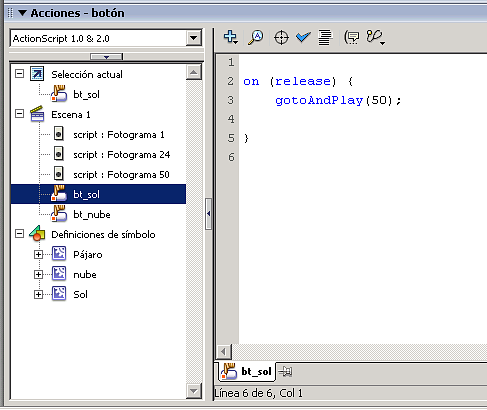
To see the objects which have ActionScript, we have in Actions palette a window:
image041.png14 KB
To see the ActionScript options we can see the following example (source):
With the buttons down-left we can do:
Sun: Jump to the 50th frame in the scene.
Cloud: Reboot the scene
Drag & Drop: Go to anothe scene which contains a template of the Flash common libraries.
A parte del buen planteamiento de la orientación a objetos. Flash tiene este lenguaje de Script que potencia mucho las aplicaciones.
En un futuro haremos una serie de artículos analizando las posibilidades. De momento os comento como poder iniciar el uso.
Para poder ver las acciones impresas a un objeto (por ejemplo un botón tenemos la paleta Acciones. Ventana-->Acciones:
image047.png87.2 KB
En la figura:
A la izquierda tenemos:
Arriba: las librerías con todas las funciones posibles ActinoScript
Abajo: todos los objetos del fichero que contienen ActionScript
A la derecha tenemos el script.
OJO: para poder meterle acciones, hay que hacer que se comporte como clip de película:
image039.png2.5 KB
Aunque lo mejor es, para ordenarlo todo bien, crearte un clip de película en la biblioteca y anidarlo correctamente.
Para ver lo puntos en los que tengo ActionScript dentro de la escena, tenemos en la paleta Acciones una ventanita:
image041.png14 KB
Para poder ver las opciones de action Sript hemos creado el ejemplo (fuente):
Con los botones abajo-izquierda hacemos:
Sol: Saltamos al frame 50 de la escena.
Nube: Reiniciamos la Escena
Drag & Drop: Nos vamos a otra escena que contiene una plantilla de las Bibliotecas comunes de Flash.
Dec 13, 07 by Juan Lebrijo about design, Windows, blog
Here I leave another pair of ideas to customize our desktop: a Dock style task bar and a screensaver to colaborate with scientific projects at idle inactivity times of your PC.
Tasks bar
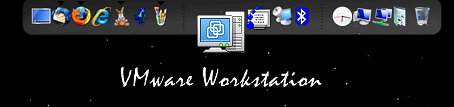
At first we have the Dock style task bar. Start bar typical from Macintosh:
Dock y un salvapantallas para colaborar en proyectos científicos en los periodos de inactividad del PC.
Barra de tareas
La primera es la barra de herramientas tipo Dock (muelle ó bahía). La barra de inicio típica de Mac:
bar.PNG21.3 KB
This bar is a little application qhich executes in background filling a bit of memory. It have much customize posibilities.
The application is called Rocketdock and is developed by Punk Labs.
With this application, at inactivity computer periods (when sceensaver ups), proccess data for a scientific project.
The client: In my computer I install a software (BOINC client) which gets the data portions to analyze. It analyze data. And when finished the analysis connects to server to leave the results, and ask for new portions. All this wor can be realize when screensaver gets up.
The server (Berkeley): collects telescope data (from Arecibo) and divide them in portions to share with the distributed BOIN clients. After collect the data proccessed.
You can choose among some projects, every gives a screensaver when data proccessing.
I have chosen the SETI@home project, which provides an spectacular screensaver. It shows spectral density of signal analyzed, and other gaussians analysis.
Through these calculations they are finding some signal of inteligence in the out space.
I wil leave an screensaver image:
[singlepic=5,320,240]