Oct 22, 07 by Juan Lebrijo about Services, Web, blog
PHP es un lenguaje de script de lado de servidor, es decir, se ejecuta el código en el servidor, y le devuelve HTML al usuario.
Instalaremos PHP5 sobre apache para una distro Debian etch.
Instalamos con apt:
elite:~# apt-get install php5 php5-common libapache2-mod-php5 php5-gd php5-imap php5-ldap php5-mysql php5-odbc php5-snmp
Leyendo lista de paquetes... Hecho
Creando árbol de dependencias... Hecho
Se instalarán los siguientes paquetes extras:
  apache2-mpm-prefork libc-client2002edebian libmysqlclient15off libt1-5 libxml2 mlock mysql-common odbcinst1debian1 unixodbc
Paquetes sugeridos:
  php-pear uw-mailutils libmyodbc odbc-postgresql libct1
Paquetes recomendados
  xml-core
Los siguientes paquetes se ELIMINARÃN:
  apache2-mpm-worker
Se instalarán los siguientes paquetes NUEVOS:
  apache2-mpm-prefork libapache2-mod-php5 libc-client2002edebian libmysqlclient15off libt1-5 libxml2 mlock mysql-common odbcinst1debian1
  php5 php5-common php5-gd php5-imap php5-ldap php5-mysql php5-odbc php5-snmp unixodbc
0 actualizados, 18 se instalarán, 1 para eliminar y 1 no actualizados.
Necesito descargar 6963kB de archivos.
Se utilizarán 14,7MB de espacio de disco adicional después de desempaquetar.
En el php.ini, abrimos el debug de errores:
display_errors = On
log_errors = On
Reiniciamos apache: /etc/init.d/apache2 restart
Para comprobar el correcto funcionamiento:
Creamos una página /var/www/index.php de prueba:
LAMP Server Test
Si nuestro raíz es /var/www podremos ver esta página con PHP funcionando: http://www.midominio.com.
Si quereis profundizar más os dejo la ficha habitual:
Origen
http://www.php.net/
Repositorio
http://www.php.net/downloads.php
Paquete
apt 5.2.0-8
Documentación (Castellano)
http://www.php.net/manual/es/
Documentación (Inglés)
Ficheros
Configuración: /etc/php5/apache2/php.ini
Log: /var/log/apache2
Instalaremos un servidor de base de datos en red MySQL sobre un Debian etch.
Instalar:
elite:~# apt-get install mysql-server mysql-client
Leyendo lista de paquetes... Hecho
Creando árbol de dependencias... Hecho
Se instalarán los siguientes paquetes extras:
  libdbd-mysql-perl libdbi-perl libnet-daemon-perl
 libplrpc-perl mysql-client-5.0 mysql-server-5.0
Paquetes sugeridos:
  dbishell libcompress-zlib-perl tinyca
Se instalarán los siguientes paquetes NUEVOS:
  libdbd-mysql-perl libdbi-perl libnet-daemon-perl
 libplrpc-perl mysql-client mysql-client-5.0 mysql-server
 mysql-server-5.0
0 actualizados, 8 se instalarán, 0 para eliminar y 1 no actualizados.
Necesito descargar 33,4MB de archivos.
Se utilizarán 87,7MB de espacio de disco adicional después de desempaquetar.
Aseguramos el servidor poniendo contraseña al usuario root:
Debe estar comentada la línea: bind-address = 127.0.0.1 del fichero de configuración: /etc/mysql/my.cnf. Esta línea indica que solo se debe escuchar a localhost, si se comenta , escuchamos a todo el mundo 0.0.0.0.
Creamos un esquema de pruebas:
elite:~# mysql -u root -p
Enter password:
Welcome to the MySQL monitor.  Commands end with ; or g.
Your MySQL connection id is 21 to server version: 5.0.26-Debian_0.dotdeb.1-log

Type 'help;' or 'h' for help. Type 'c' to clear the buffer.

mysql> create database pruebas;
Query OK, 1 row affected (0.00 sec)

mysql> grant all on pruebas.* to pruebas@’%’ identified by "supercontraseñasegura";
Query OK, 0 rows affected (0.05 sec)

mysql> quit
Bye
Con el usuario root nos conectaremos localmente, y con el usuario pruebas desde todos sitios.
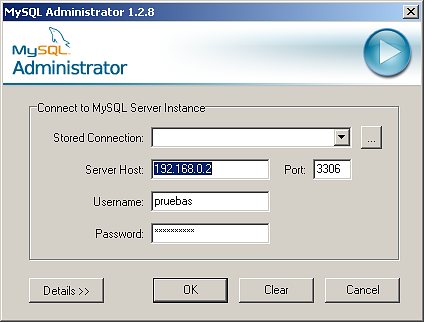
Podemos conectarnos con las herramientas de admistración (MySQL Administrator) que provee MySQL:
mysql.admin.png17.9 KB
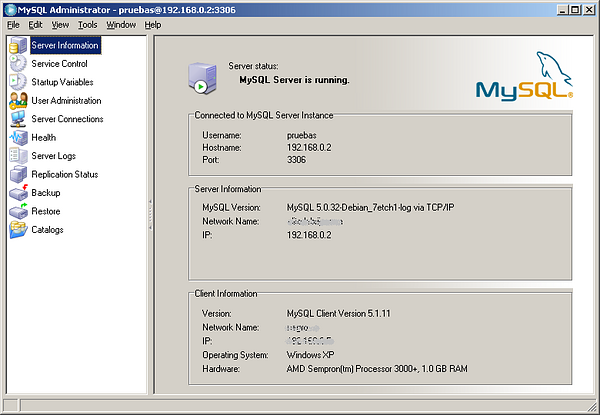
Conectaremos perfectaente:
mysql.admin.2.png102 KB
Si quereis profundizar más os dejo la ficha:
Origen
http://www.mysql.org/
Repositorio
apt
Paquete
apt 5.0.32
Documentación (Castellano)
http://www.mysql.org/doc/
Herramientas: http://www.mysql.com/products/tools/
Documentación (Inglés)
Ficheros
Configuración: /etc/mysql/my.cnf
Control demonio: /etc/init.d/mysql
Log: /var/log/mysql.log
Puertos Servidor:
3306 TCP
We are going to install a MySQL data base server over Debian etch.
Install:
elite:~# apt-get install mysql-server mysql-client
Leyendo lista de paquetes... Hecho
Creando árbol de dependencias... Hecho
Se instalarán los siguientes paquetes extras:
  libdbd-mysql-perl libdbi-perl libnet-daemon-perl
 libplrpc-perl mysql-client-5.0 mysql-server-5.0
Paquetes sugeridos:
  dbishell libcompress-zlib-perl tinyca
Se instalarán los siguientes paquetes NUEVOS:
  libdbd-mysql-perl libdbi-perl libnet-daemon-perl
 libplrpc-perl mysql-client mysql-client-5.0 mysql-server
 mysql-server-5.0
0 actualizados, 8 se instalarán, 0 para eliminar y 1 no actualizados.
Necesito descargar 33,4MB de archivos.
Se utilizarán 87,7MB de espacio de disco adicional después de desempaquetar.
Must comment the line: bind-address = 127.0.0.1 in configuration file: /etc/mysql/my.cnf. This line makes only ear to localhost, if comment, we ear all the world 0.0.0.0.
Create a test scheme:
elite:~# mysql -u root -p
Enter password:
Welcome to the MySQL monitor.  Commands end with ; or g.
Your MySQL connection id is 21 to server version: 5.0.26-Debian_0.dotdeb.1-log

Type 'help;' or 'h' for help. Type 'c' to clear the buffer.

mysql> create database pruebas;
Query OK, 1 row affected (0.00 sec)

mysql> grant all on pruebas.* to pruebas@’%’ identified by "very-secure-password";
Query OK, 0 rows affected (0.05 sec)

mysql> quit
Bye
With the root user we connect locally, and with pruebas user from all network.
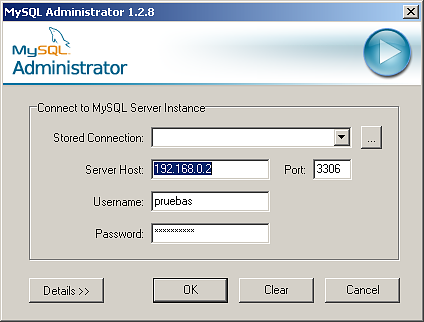
We can connect with MySQL administration tools (MySQL Administrator) provided by MySQL:
mysql.admin.png17.9 KB
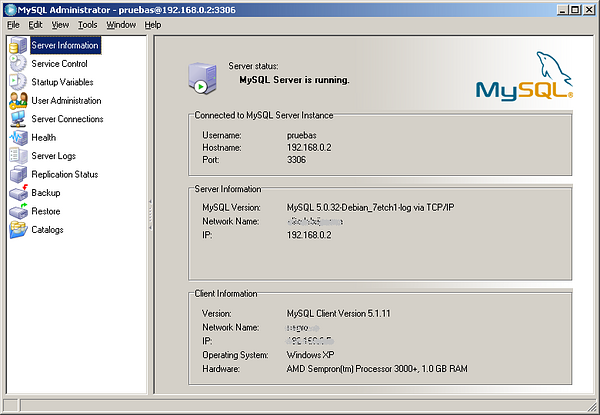
Connect perfectly:
mysql.admin.2.png102 KB
If you want extend your knowledge:
Origin
http://www.mysql.org/
Repository
apt
Package
apt 5.0.32
Documentation (Spanish)
http://www.mysql.org/doc/
Tools: http://www.mysql.com/products/tools/
Documentation (English)
Files
Configuration: /etc/mysql/my.cnf
Daemon script: /etc/init.d/mysql
Log: /var/log/mysql.log
Server ports:
3306 TCP