We are going to install a MySQL data base server over Debian etch.
Install:
elite:~# apt-get install mysql-server mysql-client
Leyendo lista de paquetes... Hecho
Creando árbol de dependencias... Hecho
Se instalarán los siguientes paquetes extras:
  libdbd-mysql-perl libdbi-perl libnet-daemon-perl
 libplrpc-perl mysql-client-5.0 mysql-server-5.0
Paquetes sugeridos:
  dbishell libcompress-zlib-perl tinyca
Se instalarán los siguientes paquetes NUEVOS:
  libdbd-mysql-perl libdbi-perl libnet-daemon-perl
 libplrpc-perl mysql-client mysql-client-5.0 mysql-server
 mysql-server-5.0
0 actualizados, 8 se instalarán, 0 para eliminar y 1 no actualizados.
Necesito descargar 33,4MB de archivos.
Se utilizarán 87,7MB de espacio de disco adicional después de desempaquetar.
Must comment the line: bind-address = 127.0.0.1 in configuration file: /etc/mysql/my.cnf. This line makes only ear to localhost, if comment, we ear all the world 0.0.0.0.
Create a test scheme:
elite:~# mysql -u root -p
Enter password:
Welcome to the MySQL monitor.  Commands end with ; or g.
Your MySQL connection id is 21 to server version: 5.0.26-Debian_0.dotdeb.1-log

Type 'help;' or 'h' for help. Type 'c' to clear the buffer.

mysql> create database pruebas;
Query OK, 1 row affected (0.00 sec)

mysql> grant all on pruebas.* to pruebas@’%’ identified by "very-secure-password";
Query OK, 0 rows affected (0.05 sec)

mysql> quit
Bye
With the root user we connect locally, and with pruebas user from all network.
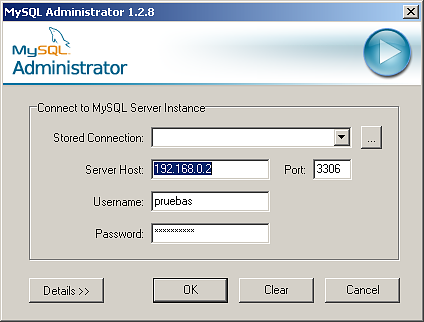
We can connect with MySQL administration tools (MySQL Administrator) provided by MySQL:
mysql.admin.png17.9 KB
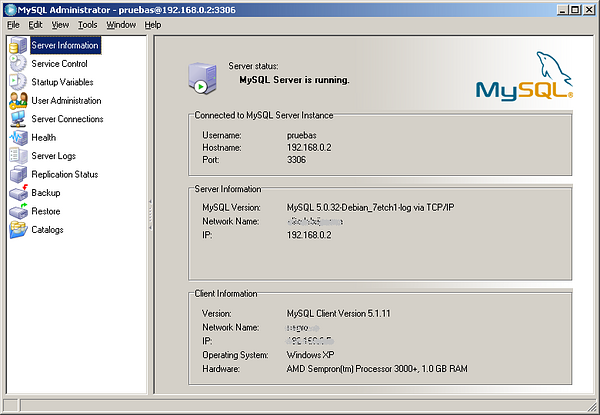
Connect perfectly:
mysql.admin.2.png102 KB
If you want extend your knowledge:
Origin
http://www.mysql.org/
Repository
apt
Package
apt 5.0.32
Documentation (Spanish)
http://www.mysql.org/doc/
Tools: http://www.mysql.com/products/tools/
Documentation (English)
Files
Configuration: /etc/mysql/my.cnf
Daemon script: /etc/init.d/mysql
Log: /var/log/mysql.log
Server ports:
3306 TCP