This is a bilingual web, but when you select up the spanish language, I want all (content+theme) to see in spanish. If your web is not polyglot, you can translate the theme clean and quicly in some following steps.
To keep a theme in spanish (or other language) i am based on anieto2k's y yukei's informaton in their blogs. anieto2k have a repository where you can share your translated theme.
We are going to detail the translate process. So that we are going to use this web based theme: Web 2.0 (download). But it can be used for any wordpress theme.
The Web 2.0 in spanish is here (for ISO-8859-1 charset, for UTF-8 charsets I leave the language files), and in theanieto2k's repository.
Tagging strings
First will be to tag the strings that we want to translate inr our PHP code.
This is the most tedious action, PHP file by file tagging the strings as follows:
RETURN __(): For the strings in functions, returns trough the 'return' the translate string. traducida.
'w2' is the translation theme domain. Used for the definition of various translation files in the same PHP code.
Then we will say to the PHP interpreter to translate where it find tags. We will do it in the header (...../wp-content/themes/web-20-100/header.php), loading the load_theme_textdomain('dominio') function:
WARNING: The language is defined in metacontent "Content-Language", where we can take the value to conmut betewwen languages: es_ES.mo, es_AR.mo,... or not translate if it do not recognize.
Extracting tagged strings
The Gettext software will extract the strings tagged, it will unify them in a po extension file.
Istalling gettext on debian:
elite:~# apt-get install gettext
Leyendo lista de paquetes... Hecho
Creando árbol de dependencias... Hecho
Paquetes sugeridos:
  cvs gettext-doc
Se instalarán los siguientes paquetes NUEVOS:
  gettext
0 actualizados, 1 se instalarán, 0 para eliminar y 1 no actualizados.
Necesito descargar 2190kB de archivos.
Se utilizarán 6582kB de espacio de disco adicional después de desempaquetar.
In our theme root (...../wp-content/themes/web-20-100/ in my case) we will create a file (file-list.txt) which contains the name of all the files touched in the tagging point:
We have the catalog generator file: es_ES.po. Let's open it and you see all the strigs referenced for the function and line where they are allocated.
We can modify the theme, and we want remake the catalog, but with no loss of made translations. Then we can use -j option, this make a 'join' with the old version of es_ES.po. More or less:
We will use PoEdit to translate text strings. For Debian (or debian based as Ubuntu) users we have PoEdit in the repositories:
elite:~# apt-get install poedit
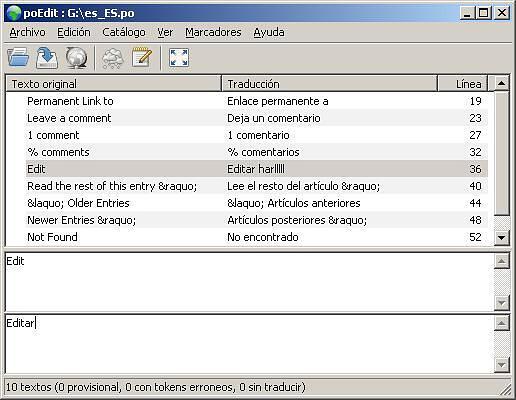
Editing the file es_ES.po, and translating ...:
poedit.JPG36.3 KB
When we save the file will generate the es_ES.mo file, this is the 'machine code' which really translates the strings.
WARNING: If in the .mo file (or .po after save) you see rare symbols (ÃÂÂ), maybe you must change the PoEdit's configuration charset, located in menu Catalog --> Options. And change, like me: ISO-8859-1.
Finally we must copy in the them root directory (...../wp-content/themes/web-20-100/ in my case) the es_ES.mo file.
Buscando la forma de internacionalizar este blog, encontre GENGO; es un plugin muy completo para WordPress que hace tu blog multilingüe. Esto puede ser útil para que tus artículos se lean en varios idiomas, ó para publicar un blog entre gente con varios lenguajes nativos.
Las características cumplidas por la versión 0.9 de Gengo son:
Capacidad ilimitada de lenguajes.
Para publicar artículos en cualquiera de los lenguajes.
Posibilidad de desinstalación total (a nivel de base de datos).
Asociar artículos como traducciones unos de otros.
Posibilidad de traducir categorías y pequeños fragmentos de texto.
Instalación
Se recomienda hacer una copia de seguridad de la base de datos que contiene vuestro blog, esto es debido a que se van a añadir tablas para soportar las características de Gengo.
Descargamos la última versión del fichero gengo.zip de la web ó directamente, en mi caso estoy instalando la 0.9.
Copiamos el directorio /gengo al de plugins de nuestro blog: wp-content/plugins/. Ojo con los permisos.
Copiamos el fichero de traducción al castellano gengo-0.9-es_ES.mo en /wp-content/plugins/gengo/gengo-es_ES.mo.
Activamos el plugin en la pantalla de Plugins de la parte de Administración de WorPress.
Añade tantos lenguajes como desees utilizar en la pantalla de administración de Gengo. El primero debe ser el predeterminado de tu blog.
Utilización
En el menú de administración de Gengo tenemos varias pestañas:
Lenguajes: Aquí podemos definir todos los lenguajes que podremos utilizar en nuestro blog.
Traducciones: Asociamos grupos de artículos como traducciones.
Sinónimos: Traducción de categorias, y fragmentos de texto.
Exclusiones: Filtros para cyas URLs Gengo no debe añadir la coleta de lenguaje.
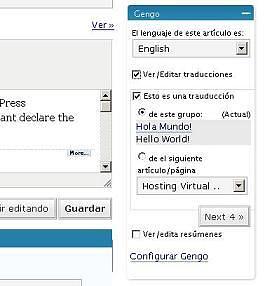
Tenemos uno de esos plugins AJAX de la pantalla de edición:
gengo.02.JPG13.9 KB
Que nos sirve para definir el lenguaje del artículo, y en su caso para defiirlo dentro de un Grupo de Traducciones.
Finalmente, y una vez asociados ambos podemos ver las traducciones:
Finalmente tenemos la pila de funciones que vienen incluidas para las plantillas gengo_template_functions.php, que es lo que más juego va a dar.
Mi traducción al Castellano
Como siempre, es un placer colaborar con gente que libera su código, agradeciendo las ventajas que nos proporcionan con sus programas. Así que haré la traducción al Castellano.
Con el programa poEdit (editor de ficheros de traducción de extensión .po), abrimos el fichero gengo.pot como "Nuevo catálogo desde un archivo POT ...", y traducimos frase por frase.
De forma que aquí teneis los ficheros de la traducción gengo-09-es_ES.zip.
Searching for the way to internazinalice this blog, I found GENGO; it is a cool WordPress plugin, that makes multilingual your blog.
This can be useful to translate your posts to various languages, or to publish a blog with other languages and countries people.
Gengo 0.9 have the following features:
Using all languages you can.
Publishing posts in any language you set.
Totally uninstalling posibility (Data base level).
Gouping posts as translations of others.
Translatig categories and Snipplets.
Installation
Strongly recommended make a backup of your database, due to the installation wil modify th database to support Gengo's features.
Download the klast version of gengo.zip file form web or directly; I am installing 0.9 version.
Copy the directory /gengo to the plugins directory of your blog: wp-content/plugins/. Be carefull with the permissions.
Copy the spanish translation file gengo-0.9-es_ES.mo in /wp-content/plugins/gengo/gengo-es_ES.mo.
Activate the plugin at Plugin screen.
Add all languages that you need in Gengo administration screen. First, add your blog default language.
Use
In the Gengo administration tab, we have any subtabs:
Languages: Here we set all the languages which we would use in our blog.
Translations: We have defined the posts translation groups.
Sinonyms: Translation of categories and snipplets.
Exclusions: Filter where we can define which URLs we do not want Gengo puts the language tags.
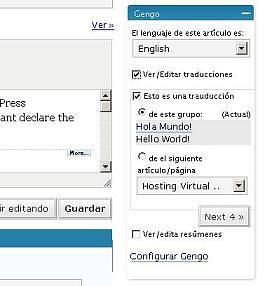
In the edition screen we have an AJAX widget to manage Gengo:
gengo.02.JPG13.9 KB
We can use it to set the post language, and the Translation Group if we nweed.
This is an example of Translation Group, my first post:
Finally, we have the function library for the templates, which we can add Gengo funcionality in our Wordpress theme: gengo_template_functions.php.
My contribution to Gengo: Spanish translation
Allways is a pleasure collab with open source coders, thanking the advantages that they give us. Then I will make the Spanish translation.
With the poEdit software (a file translation editoreditor with extension .po), open the gengo.pot file as "New catalog from POT file...", then we can translate.
Here you can download translation files: gengo-09-es_ES.zip.