Jun 19, 10 by Juan Lebrijo about arquitechture, blog
Después de largo tiempo sin escribir, y más tiempo aún siendo un poco inconstante, le he dado un pequeño lavado de cara al blog, y sobre todo a mis objetivos profesionales.
En sucesivos artículos voy a tratar de definir una arquitectura de desarrollo de aplicaciones web empresarial (grandes volúmenes de datos, desarrolladores heterogéneos, grandes servidores, grid,...), y una arquitectura start-up (bajos costes, desarrollo rápido y ágil, escalable, ...).
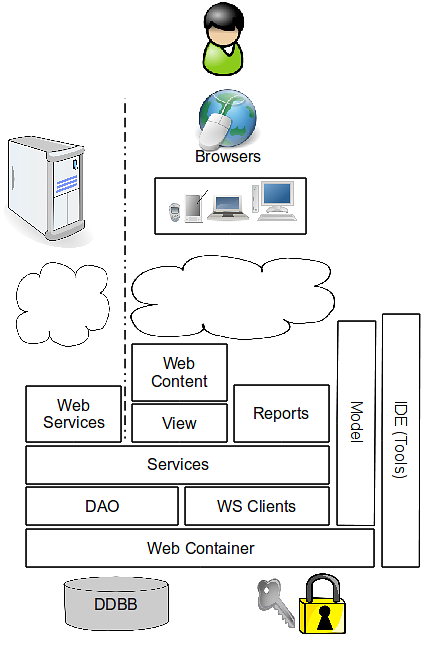
Partiremos de las tecnologías que nos ofrece actualmente el mundo Java, e iremos viendo como se construyen cada una de las partes del mapa general de la figura:
arqo.png46.9 KB
Mis clientes son dos: usuarios a través de sus navegadores, y otras aplicaciones que consumen mis servicios web. A los usuarios debo ser capaz de servirle páginas con funcionalidad e informes.
Por debajo encuentro otras capas:
Services: Capa de lógica de negocio, aquí se manipulan los objetos con el fin de mostrarlos finalmente ó persistirlos.
DAO: Capa de acceso a datos, manejo de operaciones CRUD de los objetos hacia nuestro almacén.
Web Container: es el servidor de aplicaciones, que aporta los servicios comunes entre aplicaciones (JEE)
BBDD: almacen de datos
Security: almacen de credenciales de seguridad
Model: modelo de datos de las aplicaciones
Transversalmente nos encontramos el Entorno de Desarrollo, que en realidad será un conjunto de herramientas que nos ayuden a desarrollar todo lo anterior.
Con esto dejo definido el modelo de desarrollo general, que luego iré componiendo con tecnologías concretas.
Mar 05, 10 by Juan Lebrijo about IT management, Java, Eclipse, blog
Siguiendo con nuestro objetivo de crear un entorno de desarrollo de software Extremo, hoy añadimos esta herramienta a la caja.
Maven es una herramienta de gestión de proyectos de software con las siguientes características:
Convención sobre configuración:provee de una serie de standards estructurales en los proyectos con el fin de homogeneizar la construcción de los mismos y ahorrar los quebraderos de cabeza de algunos sistemas de configuración.
${basedir}/src/main/java: para tu código
${basedir}/src/main/resources: para los ficheros de configuración
${basedir}/target/classes: para las clases java compiladas
${basedir}/target: los paquetes, jar, war, ear....
....
Maneja todos los hitos del ciclo de vida de un proyecto de software:
Ciclo de vida muy simple: Compilado --> Test --> Empaquetado
En cada hito del ciclo de vida se pueden ejecutar goals (objetivis). Por ejemplo en el empaquetado: mvn jar:jar
Controla las dependencias con otros proyectos: esta es la característica que me ha enganchado:
Olvídate de descargar los jars de spring, hibernate, configurarlas en el Java Buil Path,..... un rollo. Solución: marcas tus dependencias en el pom.xml, y el solito te las descarga y coloca en el Build path.
Los Arquetipoooos ¡¡¡¡ Son esqueletos de aplicación con pom.xml preconfigurados para hacer proyectos grails, seam, roo,... Échale un ojo a Appfuse y a los arquetipos cuando vayas a crear un nuevo proyecto maven en tu eclipse.
Ofrece un ecosistema de plugins para ejecutar todos los objetivos en las fases de cualquier proyecto.
Además en mi caso cumple unas características fundamentales:
Para abrir un poco boca haremos un pequeño ejemplo en nuestro eclipse. Para ello crearemos un nuevo proyecto File > New > Other ... > Maven > Maven Project. Marcamos "Create a simple project" para no seleccionar arquetipos. Maven te obliga a rellenar el Group Id, Artifact ID.
Podemos generar la siguiente clase de ejemplo:
package com.lebrijo.ejemploMaven;
public class Hello {

     public static void main( String[] args )    {
        System.out.println( "Hello World!" );
    }

}
el comando "mvn install" nos generaría el jar que luego ejecutaríamos con "java -cp target/simple-1.0-SNAPSHOT.jar com.lebrijo.ejemploMaven.Hello". Pero en eclipse basta con ejecutar como Java Application.
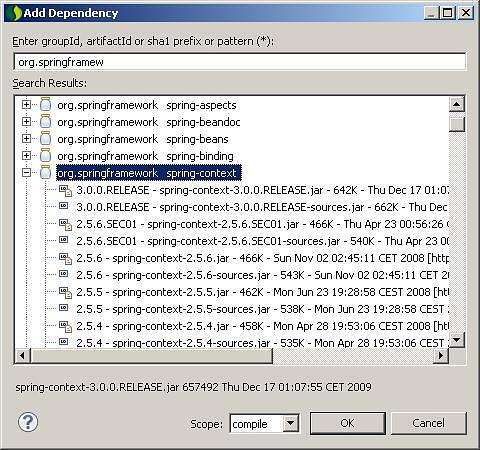
Para añadir una dependencia, botón derecho sobre el proyecto Maven > Add dependencies:
mvn_search_dependencies.JPG61.3 KB
Podríamos utilizar la inyección de dependencias de Spring haciendo la búsqueda, incluso seleccionar la versión. Después de esto actualizamos las librerías con botón derecho sobre el proyecto > Maven > Update Dependencies.
Esta acción genera el siguiente trozo al pom.xml:
Mar 05, 10 by Juan Lebrijo about IT management, Java, Eclipse, blog
Following our target, create a XP Software Development Environment, today we add another tol for the box.
Maven is a project management tool with the following main features:
Convention over configuration: it provides many estructural standards for the project in order to make easy the development, and avoid problems with many configuration files:
Very simple Life Cycle: Compiling --> Test --> Packaging
In every life cycle steps you can execute goals. In packaging for example: mvn jar:jar
Manage the dependencies with other projects, this is the feature that takes my attention:
Forget download jar libraries for spring, hibernate, configure them in Java Buil Path,..... bad stuff. Solution: write your dependencies in pom.xml, and it download them and makes the Build path.
The Archetypeeeees ¡¡¡¡ They are application skeletons with preconfigured pom.xml to develop projects like grails, seam, roo,... Take a look at Appfuse and this archetypes when you will create a project with maven in eclipse.
Have a plugin ecosystem to execute goals for all the phases in every kind of project.
Furthermore in my case gives some fundamental features:
For the begining we are going to make an example with Eclipse. Create a new project File > New > Other ... > Maven > Maven Project. Mark "Create a simple project" to avoid archetypes now. Maven makes you fill Group Id, Artifact ID.
Create the following example Class:
The command "mvn install" generate the jar that we execute with "java -cp target/simple-1.0-SNAPSHOT.jar com.lebrijo.ejemploMaven.Hello". But in Eclipse you can execute as Java Application.
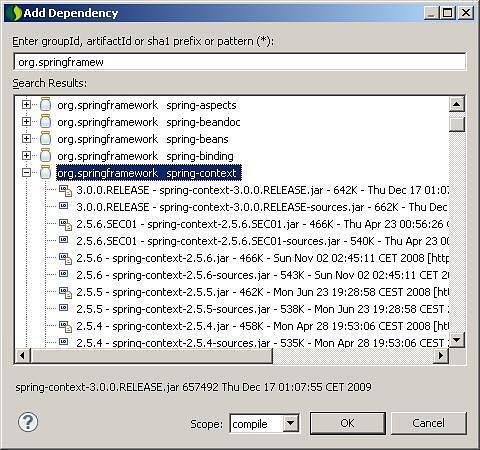
To add a dependency, right button over the project > Maven > Add dependencies:
mvn_search_dependencies.JPG61.3 KB
We could use the Spring dependency injection making the search, and select the concrete version. After thar we update the libraries with right clic over the project > Maven > Update Dependencies.
This actiion generates the followin pom.xml file: