Mar 05, 10 by Juan Lebrijo about IT management, Java, Eclipse, blog
Following our target, create a XP Software Development Environment, today we add another tol for the box.
Maven is a project management tool with the following main features:
Convention over configuration: it provides many estructural standards for the project in order to make easy the development, and avoid problems with many configuration files:
Very simple Life Cycle: Compiling --> Test --> Packaging
In every life cycle steps you can execute goals. In packaging for example: mvn jar:jar
Manage the dependencies with other projects, this is the feature that takes my attention:
Forget download jar libraries for spring, hibernate, configure them in Java Buil Path,..... bad stuff. Solution: write your dependencies in pom.xml, and it download them and makes the Build path.
The Archetypeeeees ¡¡¡¡ They are application skeletons with preconfigured pom.xml to develop projects like grails, seam, roo,... Take a look at Appfuse and this archetypes when you will create a project with maven in eclipse.
Have a plugin ecosystem to execute goals for all the phases in every kind of project.
Furthermore in my case gives some fundamental features:
For the begining we are going to make an example with Eclipse. Create a new project File > New > Other ... > Maven > Maven Project. Mark "Create a simple project" to avoid archetypes now. Maven makes you fill Group Id, Artifact ID.
Create the following example Class:
The command "mvn install" generate the jar that we execute with "java -cp target/simple-1.0-SNAPSHOT.jar com.lebrijo.ejemploMaven.Hello". But in Eclipse you can execute as Java Application.
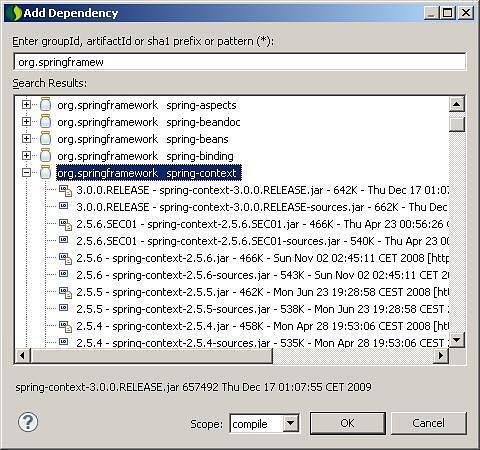
To add a dependency, right button over the project > Maven > Add dependencies:
mvn_search_dependencies.JPG61.3 KB
We could use the Spring dependency injection making the search, and select the concrete version. After thar we update the libraries with right clic over the project > Maven > Update Dependencies.
This actiion generates the followin pom.xml file: