Los Data Controls son objetos que actúan como una capa intermedia entre la capa de vista y la de negocio en la arquitectura de JDeveloper. Estos dan una forma consistente de manejar las colecciones de datos para mostrarse en la vista. Manejan el modelo, y los servicios de negocio, capturando los datos, manejando la transaccionalidad a través de la vista.
Esta parte, que le da más potencialidad sobre todo a la hora de desarrollar la vista, me gusta menos en cuanto a que se sale del estandar JSF/EJB .... y te genera una serie de ficheros automaticamente, que no se encuentra en otras arquitecturas.
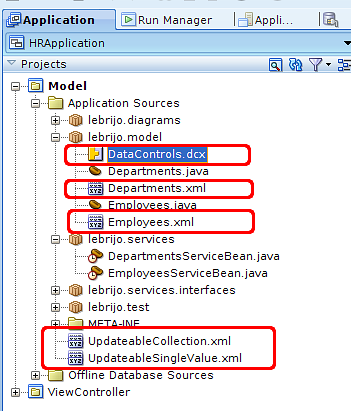
Nos basaremos en posts anteriores donde hemos construido hasta la capa de negocio de una aplicación. Con el botón derecho sobre cada una de las clases de servicio desarrolladas > Create Data Control.
Te riega el proyecto con los siguientes ficheros:
files_created.png26.3 KB
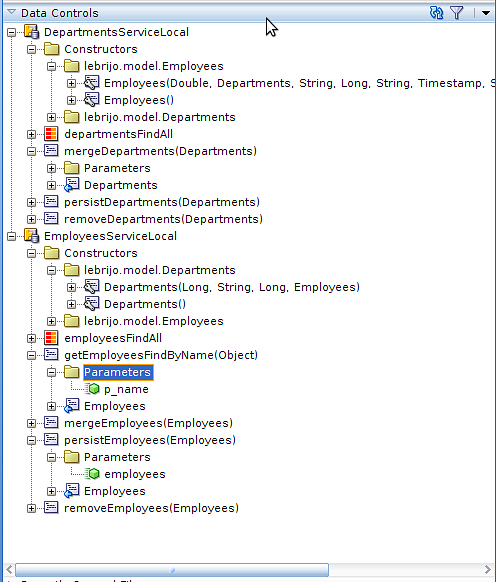
Todos son ficheros XML que lo que hacen es mapear los métodos y beans involucrados en los servicios que quieras consumir desde la vista. Sirve para que el IDE fije los elementos que tiene en la lógica de negocio, y el desarrollador simplemente arrastrando desde la ventana "Data Controls" cree los componentes de la vista sobre el lienzo:
data_control_window.png30.1 KB
Esto es una acción automática y se repetirátantas veces como cambiemos modelo, o añadamos métodos de negocio.
Aug 18, 10 by Juan Lebrijo about weblogic, JDeveloper, blog
En este post nos ocuparemos de como resuelve JDeveloper la capa de negocio. EJB 3.0 es el estándar para resolver esta capa. Se trata de construir los procesos de negocio, que luego serán llamados por la vista, los servicios web, ....
Nos basaremos en el post anterior, donde creamos la capa de persistencia para nuestra pequeña aplicación.
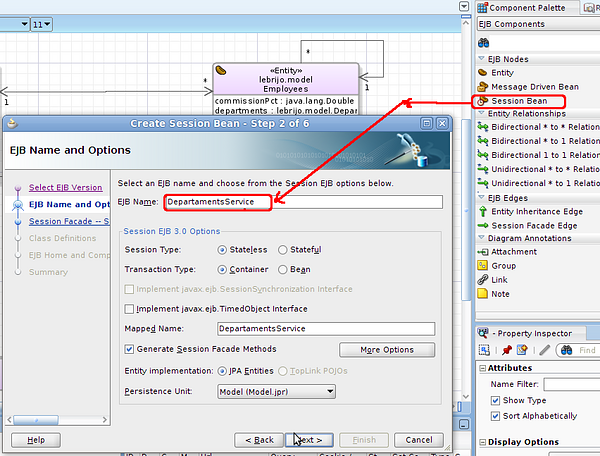
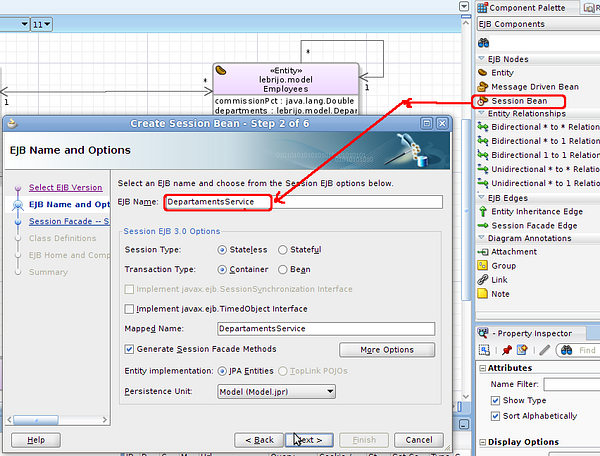
En el diagrama EJB que creamos anteriormente, basta con arrastrar de la paleta el Session Bean, para que se inicie el wizard para crear el bean:
create_session_bean.png194 KB
Creamos el bean lebrijo.services.DepartamentsServiceBean, solo seleccionaremos los métodos de la entidad Departaments. En el que se crearán los métodos: persist, merge, remove y getDepartamentsFindAll(). Nos creará dos interfaces: local y remota, por si ejecutamos el servicio en la misma o distinta máquina virtual.
JDeveloper implementa un patrón fachada con las acciones CRUD (Create-Read-Update-Delete) sobre las entidades.
Cuando creemos el lebrijo.services.EmployeesServiceBean se creará además el método getEmployeesFindByName, ya que creamos la query en el artículo anterior en la entidad. Para añadir más métodos basados en EJB-QL que vayan surgiendo podemos hacerlo mediante menú contextual >Edit Session Facade...
Para mantenerlo simple estoy guardando las entidades en un subpaquete de servicios llamado services.interfaces.
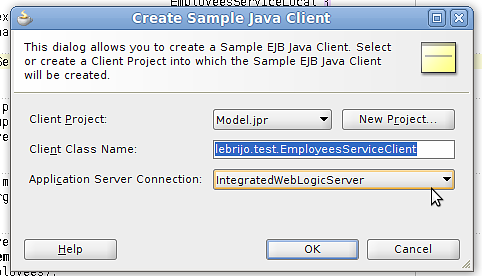
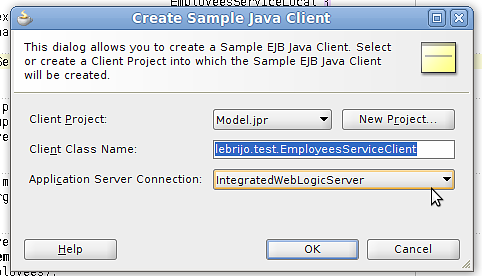
Podemos probar el servicio con el botón derecho sobre el EmployeesServiceBean > Create Sample Java Client, en el que crearemos lebrijo.test.EmployeesServiceClient:
create_sample_java_client.png25.5 KB
Al método findByName le ponemos el parámetro "%P" para encontrar todos los empleados que comienzan con P.
            for (Employees employees : (List)employeesService.getEmployeesFindByName( "P%" )) {
                printEmployees(employees);
            }
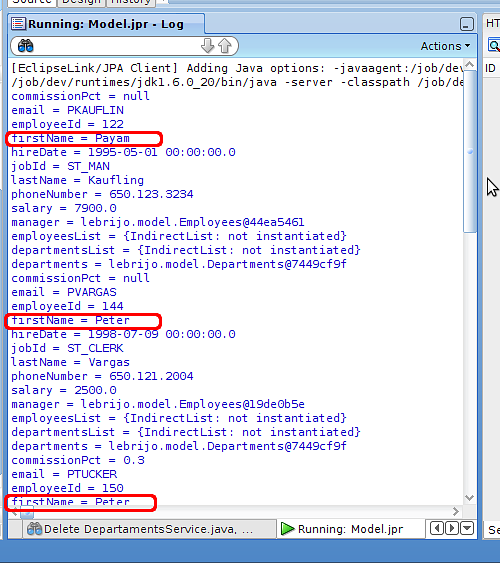
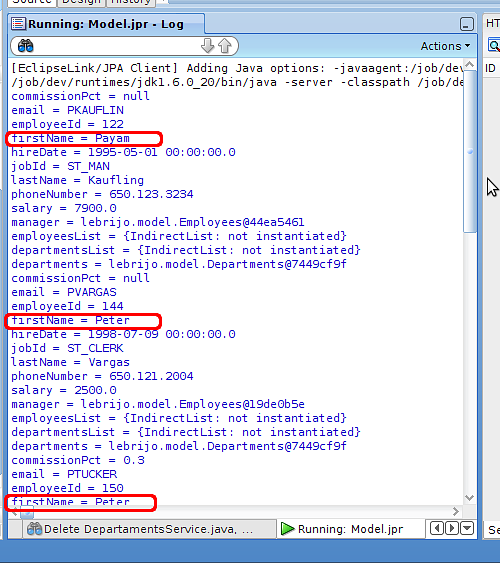
Al hacer Run con el menú contextual sobre el EmployeesServiceBean, se arrancará Weblogic desplegando la aplicación. Y haciendo 'Run' con EmployeesServiceClient, se ejecutará la prueba: mostrará en el log del servidor de Weblogic los empleados que empiezan por P:
test_client.png34.5 KB
Aug 18, 10 by Juan Lebrijo about weblogic, JDeveloper, blog
In this phase we will see how JDeveloper solves the business layer. EJB 3.0 is the standard to solve it. This is about to construct the business process, which will be called by the view, web services, ...
We will base on a past post, where we created the persistence layer for our little application.
In the EJB diagram created before, we just drag the Session Bean from the palette, to begin the wizard to create the bean:
create_session_bean.png194 KB
I create the bean lebrijo.services.DepartmentsServiceBean, we only select the Departments entity methods. It creates the methods: persist, merge, remove and getDepartamentsFindAll(). It creates two interfaces: local and remote, to execute the service at the same or outside the virtual machine.
JDeveloper implements a facade pattern with CRUD actions (Create-Read-Update-Delete) over the entities.
When we create th bean lebrijo.services.EmployeesServiceBean will be created the getEmployeesFindByName method, because we created this query in the past post. If you want to add more EJB-QL methods based, we could do it with contextual menu >Edit Session Facade...
To keep it simple I hold the interfaces in a subpackage called services.interfaces.
We can test the service with right button over EmployeesServiceBean > Create Sample Java Client, with we create lebrijo.test.EmployeesServiceClient:
create_sample_java_client.png25.5 KB
We will write the parameter "%P" to find the employee whose name starts with P.
            for (Employees employees : (List)employeesService.getEmployeesFindByName( "P%" )) {
                printEmployees(employees);
            }
Making 'Run' with contextual menu over EmployeesServiceBean, Weblogic starts deploying the application. An making 'Run' over EmployeesServiceClient, it will be executed the test: it shows the log of the server with all employee whose name starts with P:
test_client.png34.5 KB