Sep 18, 14 by Juan Lebrijo about vagrant, Ubuntu, chef, blog
Here we will cover how to create a Vagrant Box. In this case I want to install chef-solo over an Ubuntu/trusty image. You can clone all work in this post from this repo https://github.com/jlebrijo/trusty64-chef.
mkdir trusty64-chef
cd trusty64-chef/
rbenv local 2.1.2
gem install bundle
Start box: 'vagrant up'. Install Chef in the image:
knife solo prepare vagrant@192.168.10.25 ## password: vagrant
Update Ubuntu:
vagrant ssh
sudo apt-get update
Package the Box: `vagrant package --base trusty64-chef_default_1409751631640_92694 --output trusty64-chef.box`
Add to local Box list: `vagrant box add lebrijo/trusty64-chef package.box`
Upload the box to a HTTP server: `scp trusty64-chef.box lebrijoc@files.lebrijo.com:www/lebrijo.com/files`
Create an account and entry in vagrantcloud.com [lebrijo/trusty64-chef](https://vagrantcloud.com/lebrijo/trusty64-chef)
sudo apt-get install curl
curl -L get.rvm.io | bash -s stable --auto
source /etc/profile.d/rvm.sh << or whatever says the console of rvm >>
After that, you need to check which RVM prerequisites depends on :
rvm requirements
Install last ruby version:
rvm install 2.1.2
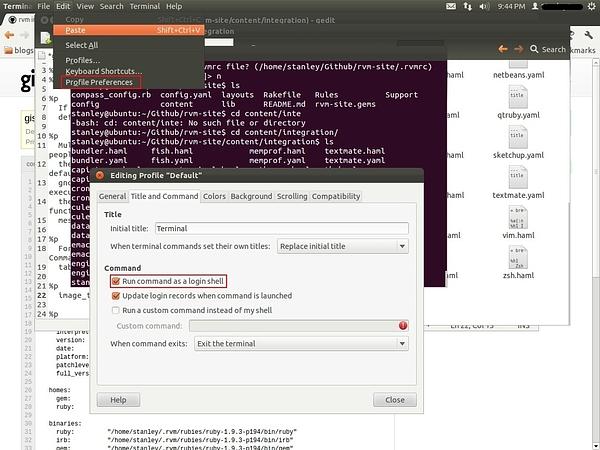
For .bashrc executing purposes, and execute RVM ruby version when open a project, you can integrate RVM with your Gnome terminal:
rvm-gnome-terminal-integration.jpg140 KB
Deeper explanation here: https://rvm.io/integration/gnome-terminal/
My favourite way to configure a Rails project ruby-version and gemset is in Gemfile:
#ruby=ruby-2.1.2
#ruby-gemset=website
But you always you can use .ruby-version and .ruby-gemset files.
Sep 13, 14 by Juan Lebrijo about gotealeaf, vagrant, chef, capistrano, ruby, blog
In our new collaboration with Tealeaf Academy friends, we are writing about Chef/Vagrant and how to use them to manage and test your servers configuration.
This is a step-by-step guide (including github projects) to bootstrap and cook a basic Rails server:
Step 1. Vagrant: Creating your Development environment (Server Virtualization)