Mar 26, 08 by Juan Lebrijo about NetBeans, Database, blog
At this post we are going to see how to connect Netbeans IDE to your Database. In my case I work over Oracle SGBD, then I will access to this SGBD.
We will use the JDBC standar, java based for remote DDBB connections purposes.
Let's see two base links for the purpose of this post::
This is a Netbenas wiki post where are written links to all SGBD drivers supported. Then, if you are searching for PosgreSQL, MySQL, M$, DB2,.. you can try it.
Here we have the Oracle JDBC driver. I can afirm that it would run for any Oracle version up to 9i.
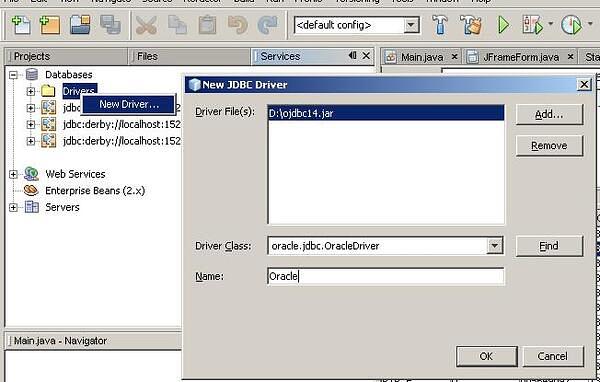
In the second link I downloaded the driver in the file: ojdbc14.jar. The installation is at the tab Services --> clicking the right mouse button over Drivers --> New Driver ...NB_SGBD_01.JPG33.9 KB
We look for the driver downloaded in our system, and install it.
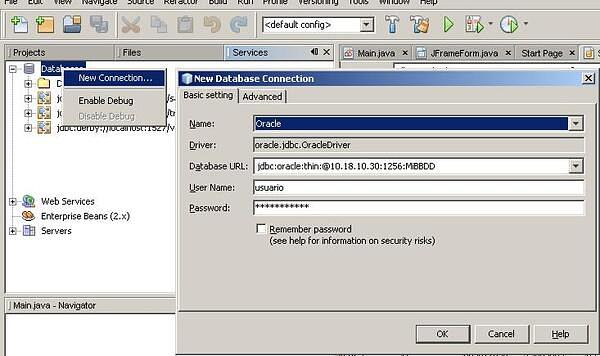
To create a new connection, we will do at tab Services --> clicking the right mouse button over DataBases --> New Connection ...NB_SGBD_02.JPG35.5 KB
We must make our connection URL with the following model:
jdbc:oracle:thin:@{HOST}:{PORT}:{SID}
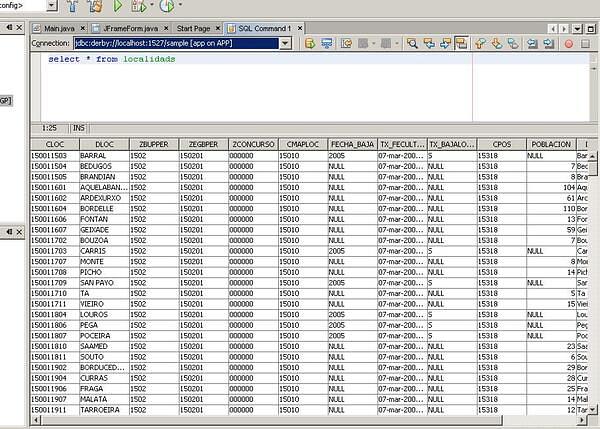
You can probe the connection making queries in the front window:
NB_SGBD_03.JPG63.8 KB
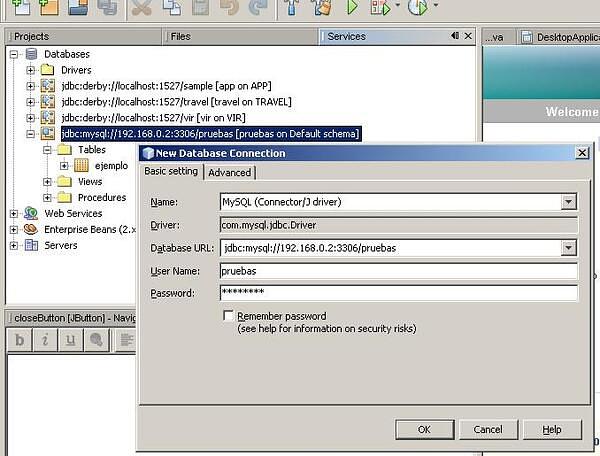
Obviously, with a JDBC preinstalled in Netbeans as MySQL driver, would be easier create a connection. You can see a MySQL example at the image:
NB_SGBD_04.JPG44.6 KB