Sep 10, 10 by Juan Lebrijo about weblogic, JDeveloper, blog
In Cloud Computing the way to deploy our applications is through an eclipse plug-in. We can feel this effect with JDeveloper, adding a remote WebLogic server, it is out of your local machine (at Amazon WS for example).
This can be useful for:
Implement an agile development environment (RAD).
Deploy for testing out of your machine becouse local use to be slower.
As I comment, for Oracle Cloud Development Style.
Having apps layer separated, as Ilike(scalability, performance).
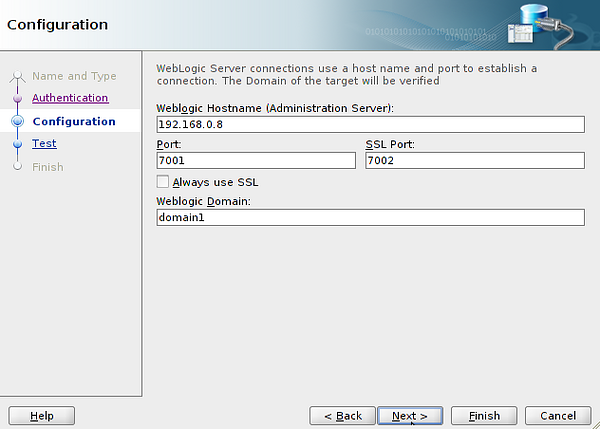
In JDeveloper > New > Connection > Application Server Connection, I named WeblogicRemote. The wizard asks for the password and network configuration:
app_server_conf.png82.8 KB
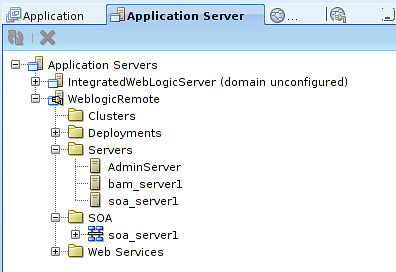
Finally have the possibility to test the configuration, with success if you do it ok. You can see at Application Servers Window yours:
app_server_win.png17.9 KB
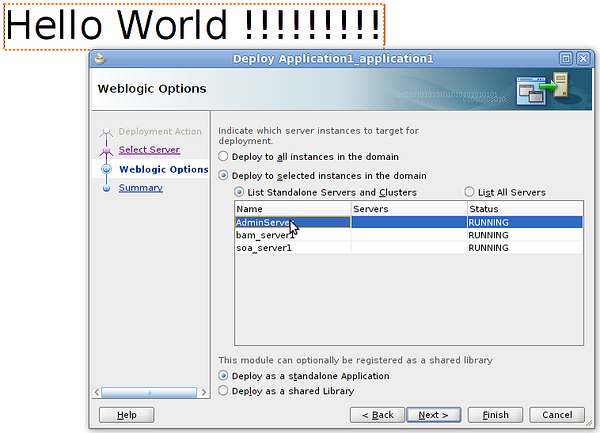
You can make a simple Web Application with an index.jsp with a Hello World !!!, to test. In the top menu Application > Deploy . You must select the last created connection, and the server in you WebLogic where you want to deploy:
deploy.png110 KB
Then we have our application at: http://192.168.0.8:7001/Application1-ViewController-context-root/faces/index.jsp
Do nor scare for the URL, that is where we deploy our view (/Application1-ViewController-context-root/), this name can be change at the project ViewControler > Properties > Java EE Web Context Root