In administrative environments we find with the requirement of a master/detail form. For example to browse the employee in a certain department, or the clients who bought each one of our products.
Based on the Human Resources Oracle application we will make a master/detail to navigate over the company departments.
Example application in HRApplication.zip.
Create a New > JSF Page, using the template created in the last articles.
From the Components Palette add a "Panel Spliter" change it to vertical in order that the master will be over the detail table.
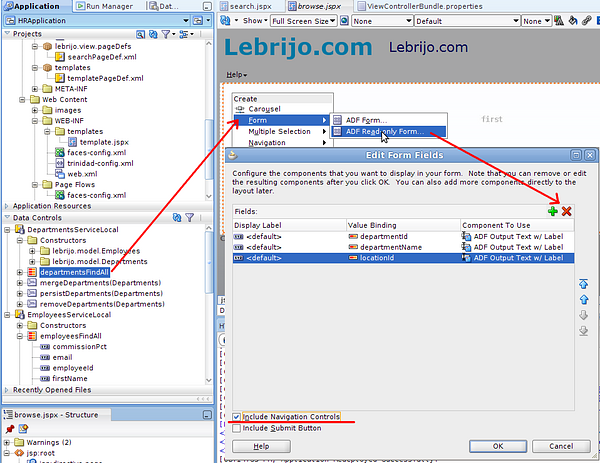
From "Data Controls" window drag the departmentsfindAllselecting the "ADF Read-only Form", delete all the fields except the department one, and include navigation buttons (selecting it):
create_master.png188 KB
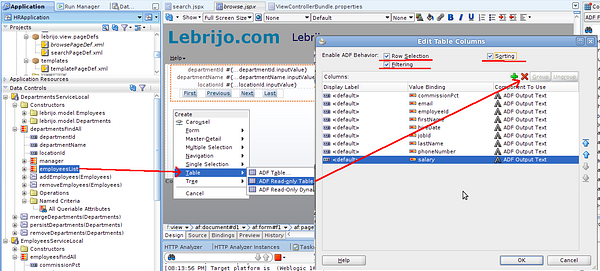
We create the detail by selecting from the "Data Controls" departmentsFindAll > employeesList, and dropping it to the bellow quadrant. Select all relevant fields for the employer, and filtering, sorting and selecting capabilities:
create_detail.png143 KB
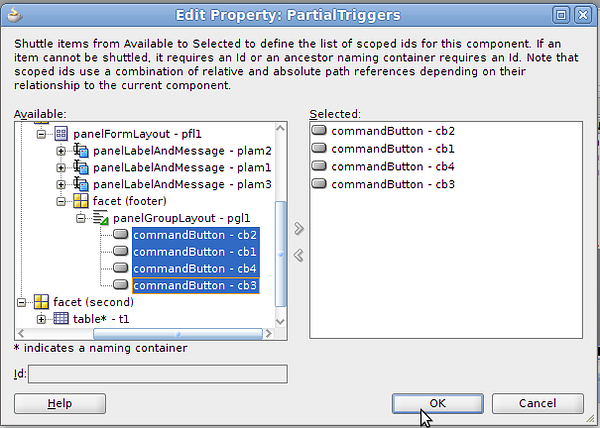
In the eployee-detail-table select in the properties window Behaviour > PartialTriggers >Edit, select the four buttons for the master table, to change when the user touch them:
select_buttons.png151 KB
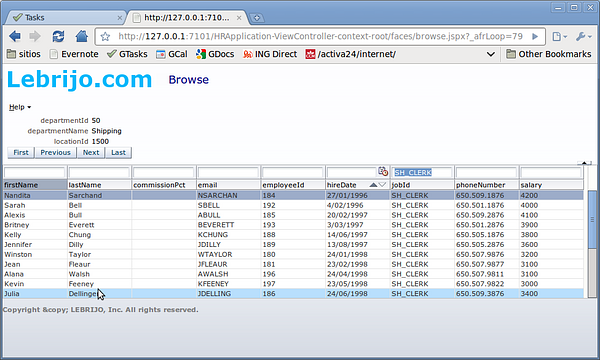
To test it, select "Run" over the browse.jspx page:
master_detail.png127 KB
In this view you can see the versatility of the tables, you can:
Move the columns.
Sort by every column ascendant/descendant.
Filter over each column with a find string.
Very interesting features in an administrative environment.