Sep 05, 10 by Juan Lebrijo about weblogic, JDeveloper, blog
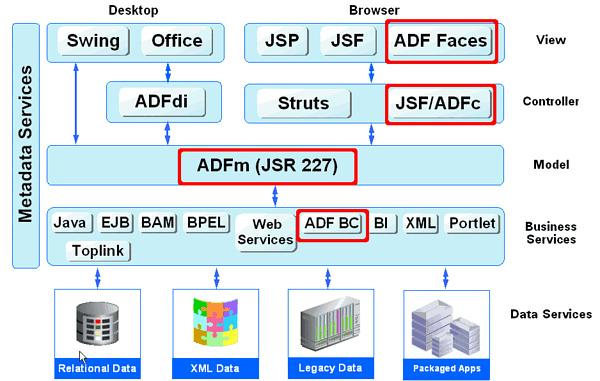
After explore diferent ways, trying to cover the business layer with Spring/Eclipse and after that with EJB 3. If you want to develop with Oracle ADF framework, our best choice is ADFbc (business components). The reason, simple, it is better integrated with top layers (data controls and view) than EJB, this is the reference solution of the company (Oracle).
Finally I choose the Oracle Development full stack, it is the best integrated, and then the most productive:
adfsimple.gif43.4 KB
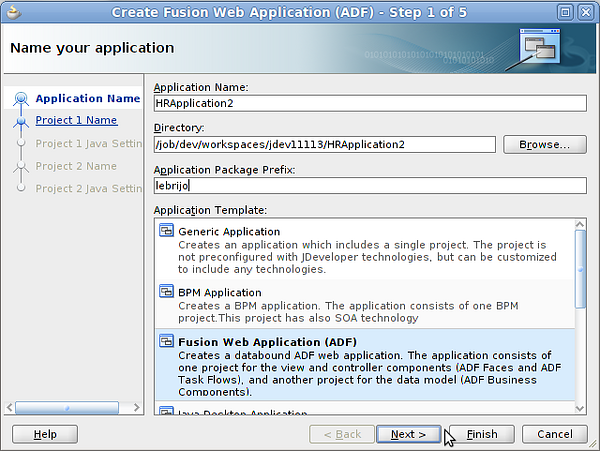
To create the application in JDeveloper select File > New > Applications > Fusion Web Application (ADF). We call it HRApplication2:
create_app.png173 KB
As in the case of Java Web generic Application, it will create tw projects:
ViewController: contains the wiew layer of our application, ADF.
Model: contains XML with our entities and relations in ADFbc.
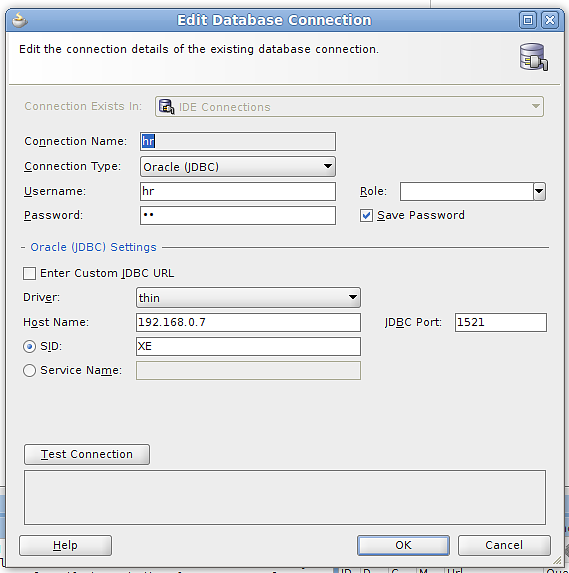
To create a database connection go to the "Database Navigator" tab, and with right buton> New, introduce the connection configuration:
db-connection.png31.2 KB
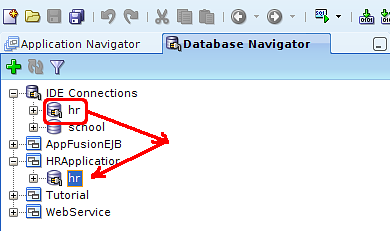
Drag and drop the connection to our application:
drag_drop_hr.png17.9 KB
Then we are ready to start modeling and programming.