If you have only an Iphone App you can use only APN. But if you will have both Iphone and Android Apps, it could be a good idea to talk with the iOS Developers about to use GCM, in order to simplify the final System (need to talk, maybe they have great arguments to use APN).
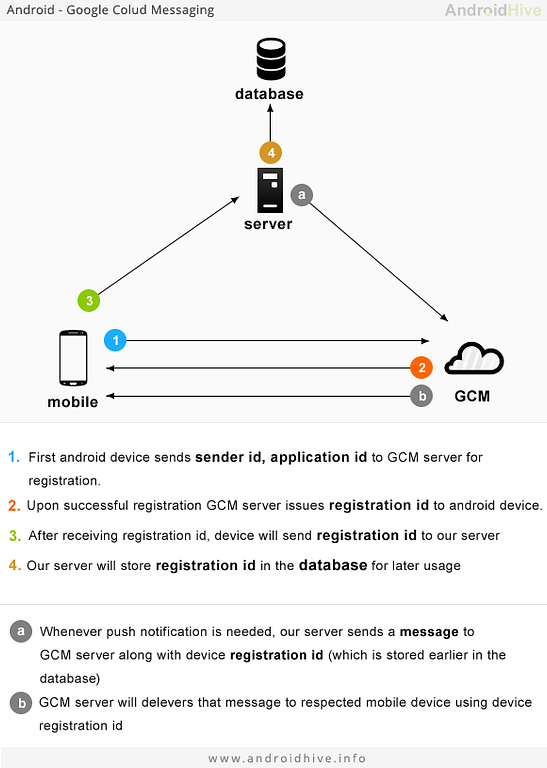
I found this great schema at androidhive.info:
gcm-a-modr.png26.5 KB
APN works similar. Our Rails server will need to:
(3) Create an API end-point which stores the registration_id
(a) Send push messages from our app
Our API can be '/v1/push_registration' receiving a messages like:
The second point can be resolved with a gem. Below we will analyze some solutions for that point.
Bot apn_on_rails and gcm_on_rails seems outdated, as the last commit happened in 2012, and there were many changes in Rails and in the APN/GCM services themselves.
This gem only supports the GCM service. But there is no problem with Iphone Apps because this service supports them.
Implementation:
Initialize object:
require 'gcm'
gcm = GCM.new("my_api_key")
Send a message:
registration_ids= ["12", "13"] # an array of one or more client registration IDs
options = {data: {message: "Hello World"}, collapse_key: "updated_score"}
response = gcm.send(registration_ids, options)
This gem supports all push services we find in the market: APN, GCM, Windows and Amazon. And it is by far the most active, so seems the facto gem to deal with the current Push Notification feature in ruby world.
Implementation:
We can initialize both services with their API keys:
Rpush gem seems the best option because it supports all Push services, and is the most active gem in this area.
For your Rails App we will need (for our config file) the Application name and the auth_key.
Jun 15, 15 by Juan Lebrijo about nginx, ruby on rails, ruby, blog
In the 'scary free internet' we can have DoS attacks or simply a client who has an error using your APi sending thousands of requests in a minute. This could have bad effects in your application performance.
To avoid these effects we can implement this example in our web app: Every IP cannot make more than 10 requests per minute, from that limit we should reject the requests
Mar 16, 15 by Juan Lebrijo about ruby, code metrics, jenkins, blog
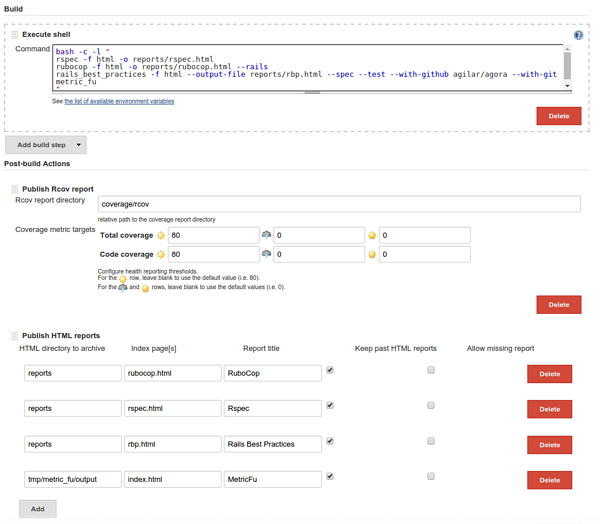
In the ruby world we have several tools to analyse our ruby (and Rails) code. In this article we will see the most used (and useful for me), and how to integrate into our CI process with Jenkins.
These gems are:
Simplecov: This analyses the coverture of your tests (rspec and minitest)